Monday.com Pricing Teardown: What SaaS Founders Can Learn
A strategic analysis of Monday.com's pricing structure using Tierly's competitive intelligence. 5 lessons on pricing a multi-product work platform against Asana, ClickUp, Trello, Smartsheet, and Wrike.
Imagine you lead a 5-person team that just outgrew Trello. You search "Monday.com pricing" and land on not one but four separate product pricing pages, a 3-seat minimum you did not expect, and annual discounts that swing from 14% to 25% with no apparent logic. What is going on here?
That question is what drove this analysis. We ran Monday.com through Tierly's AI-powered pricing analysis, comparing it against Asana, ClickUp, Trello, Smartsheet, and Wrike. The result? A $1B+ ARR platform with 245,000 customers that scores 7.6/10 overall, tied for #2 with strong tactical execution (8.0/10 product score) but held back by strategic pricing decisions around discount consistency and feature gating. Five lessons emerged, and each one reveals a pricing decision that SaaS founders can either replicate or deliberately avoid.
What Is Monday.com Pricing in 2026?
Monday.com Work Management offers 5 plans. All paid plans require a minimum of 3 seats.
| Plan | Monthly (per seat) | Annual (per seat/mo) | Min Seats | Best For |
|---|---|---|---|---|
| Free | $0 | $0 | 1-2 | Individual use only |
| Basic | $12 | $9 | 3 | Small teams needing boards |
| Standard | $14 | $12 | 3 | Growing teams with automations |
| Pro | $24 | $19 | 3 | Teams needing time tracking + formulas |
| Enterprise | Custom | Custom | Negotiable | Orgs needing governance + security |
Monday.com pricing does not stop at Work Management, though. The company runs 4 separate products, each with its own pricing page:
⦿ monday Work Management (the core project management product, analyzed above).
⦿ monday CRM (sales pipeline management starting at $10/seat/month, annual).
⦿ monday Dev (software development workflows with sprint management).
⦿ monday Service (IT and customer service desk with ticketing).
Each product has its own Free/Basic/Standard/Pro/Enterprise ladder. A team using Work Management and CRM pays for both products separately. This multi-product pricing surface is unique among the competitors we analyzed and creates both opportunity and confusion.
Why These Competitors?
Monday.com operates in the crowded "Work OS / collaborative work platform" space with over a dozen direct competitors. From that broader landscape of 14+ potential rivals (including Basecamp, Jira, Teamwork, Zoho, Hive, and others), Tierly's analysis filtered to the 5 most directly comparable platforms. The selection prioritizes tools that compete for the same buyer (referred to in pricing strategy as the "consideration set") while representing a spread across positioning tiers: budget, value, and premium.
| Competitor | Category Focus | Positioning | Why Included |
|---|---|---|---|
| Asana | Work management + goals | Premium ($23/seat avg) | Closest direct competitor, strong enterprise presence |
| ClickUp | All-in-one productivity | Budget ($10/seat avg) | Aggressive pricing, feature-rich free tier |
| Trello | Visual Kanban boards | Budget ($12/seat avg) | Atlassian ecosystem, simplest alternative |
| Smartsheet | Enterprise work management | Value ($18/seat avg) | Enterprise buyers evaluating Monday.com |
| Wrike | Professional services PM | Value ($18/seat avg) | Mid-market teams with resource planning needs |
This gives Monday.com a competitive mirror across all segments: budget options that undercut on price (ClickUp, Trello), value peers that match on price but differ on features (Smartsheet, Wrike), and a premium benchmark that charges more (Asana). The analysis reveals where Monday.com wins, where it loses, and most importantly, why.
The Tierly Analysis: How Monday.com Stacks Up
We analyzed Monday.com against 5 direct competitors in the work management category. The approach followed Tierly's dual-layer methodology:
- Tactical analysis: scoring 6 attributes per pricing tier (name, price, features, description, seats, period) across all tiers for all competitors.
- Strategic assessment: evaluating 5 dimensions of pricing architecture, psychology, and competitive positioning.
Here is what the AI found:
Competitive Positioning Analysis
| Product | Tierly Score | Avg. Price/Seat | Positioning | Key Strength |
|---|---|---|---|---|
| Trello | 8.0 | $12/mo | Budget | Simple Kanban, Atlassian ecosystem, low entry cost, transparent pricing |
| Monday.com | 8.0 | $17/mo | Value | Multi-product platform, visual workflows, 4 integrated products, Pro tier with 'Most Popular' |
| Asana | 7.8 | $23/mo | Premium | Goals + portfolios, clean UX, strong workflow automation |
| Smartsheet | 7.6 | $18/mo | Value | Enterprise governance, spreadsheet familiarity, rich formulas |
| Wrike | 7.5 | $18/mo | Value | Resource management, professional services focus, AI features |
| ClickUp | 7.4 | $10/mo | Budget | Unlimited free users, aggressive pricing, feature depth |
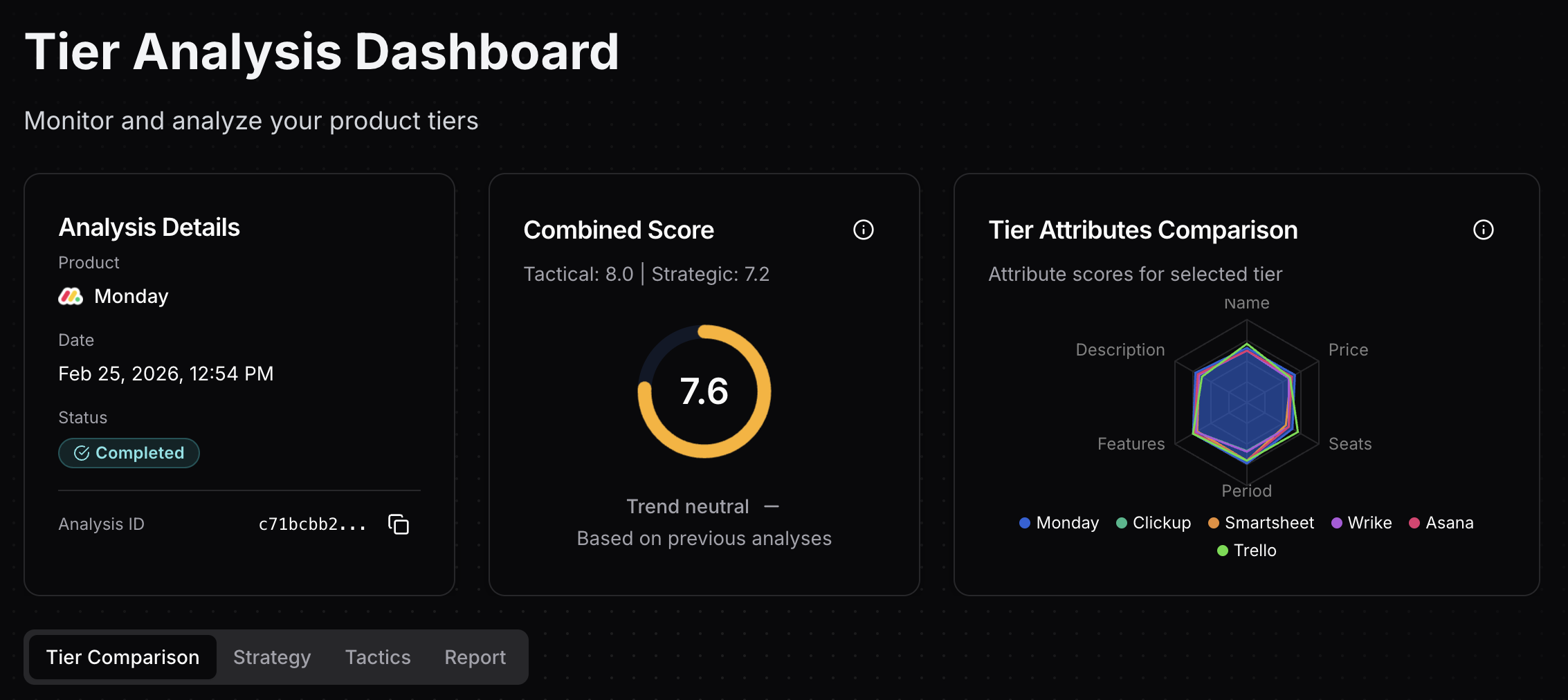 Tierly dashboard showing Monday.com's 7.6 overall score with competitor radar comparison
Indeed, the field clusters tightly from 7.4 to 8.0, with Monday.com and Trello tied at 8.0 (tactical product score), followed by Asana at 7.8. Monday.com's 8.0 tactical score (the AI's assessment of tier-level execution) combines with a 7.2 strategic score (pricing architecture and psychology) for an overall 7.6/10. The platform sits squarely in the "value" cluster, positioned between budget players (ClickUp at $10/seat avg, Trello at $12/seat avg) and premium-priced Asana ($23/seat avg).
Trello's tied #1 tactical score (8.0) is worth pausing on. It reflects a simple 4-tier ladder with transparent pricing and strong per-tier execution, even though it lacks Monday.com's multi-product depth. The reinforcement here is pertinent: tactical pricing execution (clear tier names, well-calibrated prices, strong feature communication) can match or beat feature-rich competitors when done well.
Strategic Assessment: 5 Pricing Dimensions
Beyond the tier-by-tier tactical analysis, Tierly evaluates five strategic dimensions that reveal how well a pricing structure works as a system:
Strategic Pricing Dimensions
| Dimension | Score | Key Finding |
|---|---|---|
| Value Metric Fit | 8.0/10 | Per-seat pricing with automation/integration quotas aligns with peer norms and customer value |
| Persona-Tier Fit | 8.0/10 | Each tier maps cleanly to a core persona (individual, small team, SMB, scaling, enterprise) with clear workflow alignment |
| Pricing Architecture | 7.5/10 | Good-Better-Best ladder present, but Basic→Standard gap (1.17x) is narrow; Free tier has strong upgrade triggers |
| Competitive Positioning | 7.0/10 | Value positioning between budget (ClickUp, Trello) and premium (Asana) is appropriate but unremarkable |
| Pricing Psychology | 6.0/10 | Pro labeled 'Most Popular', but no charm pricing and inconsistent annual discounts (25%/14%/21%) |
Strategic Score: 7.2/10 | Tactical Score: 8.0/10 | Combined: 7.6/10
Clearly, Monday.com's value metric (per-seat) is well-chosen, as all 5 competitors use it too. Persona-tier fit scores 8.0/10 with clean mapping from individuals (Free) to small teams (Basic) to SMBs (Standard) to scaling teams (Pro) to enterprises (Enterprise). That being said, pricing psychology (6.0/10) is the weakest dimension: while Pro has a "Most Popular" label, charm pricing is absent and annual discounts are inconsistent (25% Basic, 14% Standard, 21% Pro). What does that gap between tactical excellence and strategic weakness tell us? The five lessons below unpack exactly that.
Monday.com's Tier-by-Tier Breakdown
Tier Score Analysis
| Tier | Score | Strongest Attribute | Weakest Attribute |
|---|---|---|---|
| Free | 8.1 | Price (9.3/10) | Description (6.7/10) |
| Basic | 7.6 | Period (8.4/10) | Seats (7.0/10) |
| Standard | 8.1 | Period (8.8/10) | Description (8.4/10) |
| Pro | 8.3 | Features (9.0/10) | Seats (7.6/10) |
| Enterprise | 8.0 | Features (9.3/10) | Seats (7.0/10) |
Apparently, Pro leads at 8.3/10, followed by Free and Standard tied at 8.1/10, Enterprise at 8.0/10, and Basic at 7.6/10. Pro's features score (9.0/10) and inclusion of the "Most Popular" label in its description drive its top position. Free tier's 8.1 score is anchored by a strong price score (9.3/10) and features score (7.2/10), though its description score (6.7/10) is the weakest attribute across all tiers.
The seats attribute ranges from 7.0-7.8/10 across tiers, a moderate weakness that reveals a missed opportunity. Monday.com does not explicitly communicate who each tier is designed for in terms of team size. Adding guidance like "Best for teams of 3-5" (Basic), "Best for teams of 5-15" (Standard), or "Ideal for departments of 10+" (Pro) would strengthen clarity and guide buyer self-selection.
Lesson 1: The 3-Seat Minimum Is a Revenue Floor Disguised as a Feature
You have 2 people on Monday.com's Free plan. You hire a third. Your monthly cost jumps from $0 to $27. Not $9 for one additional seat. $27 for three mandatory seats. This is the single most important pricing decision in the entire structure, and most pricing guides skip right past it.
Here is what the 3-seat minimum actually does:
| Competitor | Entry-Level Min Spend (Annual) | Minimum Seats | Effective Per-User Cost |
|---|---|---|---|
| Monday.com Basic | $27/month ($324/year) | 3 seats | $9/seat |
| ClickUp Unlimited | $7/month ($84/year) | 1 seat | $7/seat |
| Asana Starter | $10.99/month ($132/year) | 1 seat | $10.99/seat |
| Trello Standard | $5/month ($60/year) | 1 seat | $5/seat |
| Smartsheet Pro | $9/month ($108/year) | 1 seat | $9/seat |
⦿ It creates a revenue floor. Instead of earning $9/month from a solo user on Basic, Monday.com guarantees a minimum of $27/month. Across 245,000 customers, even a small percentage of teams hitting this floor adds millions in baseline revenue.
⦿ It filters for teams, not individuals. A freelancer comparing Monday.com to ClickUp or Trello sees $27/month vs $5-7/month. That's a 4-5x difference that self-selects for team buyers, exactly the customer profile Monday.com wants.
⦿ It creates an awkward gap from Free to paid. Free supports 2 seats. The moment you add a third team member, you jump from $0 to $27/month minimum. There is no $9/month stepping stone. Tierly's pricing architecture analysis flags this Free → Basic transition as having a fence strength of 7/10 (effective as an upgrade trigger but at the cost of pushing evaluation users to competitor free plans that offer broader functionality).
The pricing audit framework we published evaluates exactly this type of pricing fence. Monday.com's Basic tier scores 7/10 on price perception. The 3-seat minimum inflates the perceived entry cost even though the per-seat price is competitive with Smartsheet Pro ($9/seat).
Founder Takeaway: Seat minimums are powerful revenue levers. That being said, they need a smooth on-ramp. If your free tier supports N users, your first paid tier should feel accessible at N+1. Monday.com's jump from 2 free seats to a mandatory 3-seat purchase at $27/month is the sharpest cliff in this competitive set. If you are building a product that serves both individuals and teams, consider whether a 1-seat paid option (even at a premium per-seat price) would capture the freelancers and 2-person teams you are currently losing.
Lesson 2: Multi-Product Pricing Is a Moat and a Maze
How many pricing pages does a platform need? For Asana, one. For ClickUp, one. For Trello, one. Monday.com has four. Work Management, CRM, Dev, and Service, each with its own pricing ladder.
Consequently, this creates a unique strategic position:
⦿ Cross-sell expansion. A team that starts with Work Management can add CRM without switching platforms. Each additional product increases switching costs and lifetime value. Monday.com's Q4 2025 earnings showed 63,914 customers with 10+ users, up 8% year-over-year, suggesting multi-product adoption is driving seat expansion.
⦿ Pricing confusion. Search "monday.com pricing" and you will find at least 4 different pricing pages. Each product has its own Free/Basic/Standard/Pro/Enterprise ladder with different feature sets. A team trying to budget for Work Management + CRM has to cross-reference two pricing pages and calculate combined costs per seat.
⦿ Inconsistent value metrics. Work Management charges per seat. CRM charges per seat. But the features, automations limits, and storage allocations differ between products at the same tier name. A "Standard" plan on Work Management is not the same as "Standard" on CRM.
What if we compare this to ClickUp's approach? One product, one pricing page, every feature category included. ClickUp Unlimited at $7/seat/month gives you project management, docs, dashboards, goals, and time tracking. A Monday.com team needing Work Management + CRM + time tracking is looking at $12/seat + $10/seat + Pro upgrade = potentially $31+/seat/month.
Tierly's strategic assessment rates Monday.com's pricing psychology at 6.0/10 (the lowest of any strategic dimension in the analysis). While Pro includes a "Most Popular" label, the absence of charm pricing and inconsistent annual discounts (25%/14%/21% across Basic/Standard/Pro), combined with multi-product complexity, creates a pricing presentation that does not fully match the platform's feature ambition.
Most companies fail at pricing not because they can't set the right price, but because they can't communicate the value clearly enough for customers to say yes.
Founder Takeaway: If you are building a multi-product platform, invest as much in pricing page UX as you do in product UX. A combined pricing calculator, bundle discounts, and clear "most popular combination" recommendations can transform multi-product complexity from a conversion barrier into an upsell engine. Along these lines, Monday.com's 4 separate pricing pages leave this money on the table.
Lesson 3: Inconsistent Annual Discounts Undermine Your Pricing Story
If you were designing a pricing ladder, would you offer your biggest annual discount on the cheapest tier and your smallest discount on the tier you most want people to choose? Monday.com does. The annual discounts across the three transparent paid tiers tell three different stories:
| Tier | Monthly | Annual (per mo) | Annual Discount | Industry Standard |
|---|---|---|---|---|
| Basic | $12 | $9 | 25.0% | ~17-20% |
| Standard | $14 | $12 | 14.3% | ~17-20% |
| Pro | $24 | $19 | 20.8% | ~17-20% |
Basic offers a generous 25% annual discount. Standard drops to just 14.3%. Pro rebounds to 20.8%. Tierly's strategic assessment explicitly flags this: "Basic annual discount is 25%, exceeding the 17-20% norm and signalling margin give-away; Standard gives 14% and Pro 21%." This inconsistency creates three problems that the competitive pricing tools we recommend should flag immediately.
Problem 1: It makes Standard look like the worst deal. Standard is the plan Monday.com should want teams to choose. It scores 7.5/10, tied with Pro for the highest of any tier. But Standard's annual discount is the weakest at 14.3%. A team comparing "save 25% on Basic" to "save 14% on Standard" may anchor on Basic because the savings message is stronger, even though Standard offers dramatically better value.
Problem 2: The 25% Basic discount signals monthly pricing is inflated. A $12 to $9 drop is a 25% discount. Best practice is 15-20%. Going above 20% risks telling customers that the monthly price is not the "real" price. It is just a penalty for not committing annually. That perception erodes pricing credibility across the entire ladder.
Problem 3: The discount pattern does not match the upgrade incentive. If you want teams to move from Basic to Standard, the annual discount on Standard should be at least as strong as Basic's. Instead, Standard offers the weakest discount, making the upgrade feel like a worse financial decision even when the feature value clearly supports it. This directly feeds the Basic-Standard blur that Tierly's persona-tier fit analysis flagged (7/10): "small collaborative team buyers uncertain which tier to choose."
How competitors handle this:
⦿ Asana: Consistent ~21% annual discount across Starter and Advanced.
⦿ ClickUp: ~30% annual discount on Unlimited and Business (aggressive but consistent).
⦿ Trello: Consistent ~17% annual discount across Standard and Premium.
The pattern is clear: consistency wins. When every tier offers the same annual savings percentage, the pricing conversation stays focused on features and value, not on which tier has the better discount deal.
Founder Takeaway: Standardize annual discounts between 15-20% across all tiers. If you want to use discounts as a steering mechanism, make the discount highest on the tier you want most customers to choose, not on the entry tier. Monday.com's 14.3% on Standard (their best-value tier) is conceivably leaving upgrade revenue on the table. This is one of the pricing intelligence patterns that is easiest to fix and hardest to notice without competitive data.
Lesson 4: Feature Gating That Forces Premature Upgrades
Consider a 10-person agency that bills clients by the hour. Time tracking is not a nice-to-have; it is the feature that turns project management into revenue management. Monday.com gates it exclusively behind the Pro tier at $19/seat/month (annual). This is a deliberate pricing fence and a controversial one.
Time tracking is the single most requested feature in project management tools. It is table stakes for agencies, consultancies, and any team that bills by the hour. Here is how competitors handle it:
| Feature | Monday.com | ClickUp | Asana | Trello | Wrike |
|---|---|---|---|---|---|
| Time Tracking | Pro ($19/mo) | Free Forever ($0) | Starter ($10.99/mo) | Not native | Business ($25/mo) |
| Formula Columns | Pro ($19/mo) | Free Forever ($0) | Not available | Not available | Not available |
| Private Boards | Pro ($19/mo) | Unlimited ($7/mo) | Starter ($10.99/mo) | Not available | Business ($25/mo) |
| Gantt/Timeline | Standard ($12/mo) | Free Forever ($0) | Starter ($10.99/mo) | Premium ($10/mo) | Team ($10/mo) |
| Guest Access | Standard ($12/mo) | Business ($12/mo) | Not available | Enterprise ($17.50/mo) | Business ($25/mo) |
Indeed, the pattern reveals Monday.com's strategy: features that affect individual productivity (time tracking, formulas, private boards) are gated at Pro. Features that affect team workflows (Gantt, guest access, automations) are gated at Standard. Tierly's analysis confirms this creates the strongest fence in the pricing ladder. The Standard → Pro step-up ratio is 1.71x with a fence strength of 8/10, driven by the 100× jump in automation/integration actions (250 → 25,000/month) plus time tracking and chart views.
This creates a specific problem for agencies and consultancies. A 10-person agency that needs time tracking for client billing has a stark choice:
- Monday.com Pro: $19/seat × 10 seats = $190/month
- ClickUp Unlimited: $7/seat × 10 seats = $70/month (time tracking included)
- Asana Starter: $10.99/seat × 10 seats = $110/month (time tracking included)
That is a 2.7x premium over ClickUp and a 1.7x premium over Asana for what is fundamentally the same capability. Yet Monday.com's Pro tier scores 8.3/10 (the highest in their lineup) because its price score (8.0/10) and features score (9.0/10) reflect that the $19/seat price point is well-positioned relative to comparable competitor tiers like Asana Advanced ($24.99/seat) and Wrike Business ($25/seat). The issue is not Pro's price or feature depth. It is that ClickUp offers time tracking for free, creating a competitive vulnerability for price-sensitive buyers.
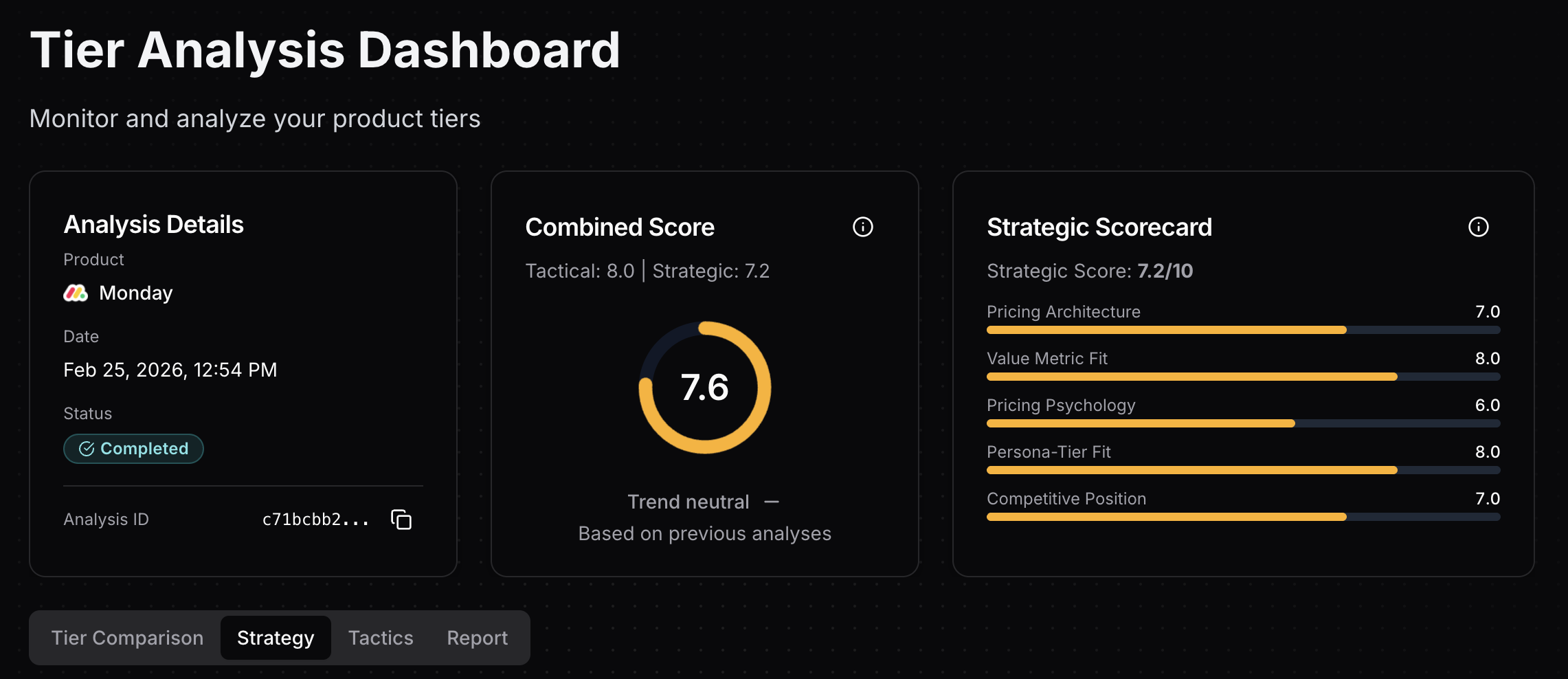 Tierly's strategic assessment dashboard showing Monday.com's 5 pricing dimensions with scores for value metric fit, persona-tier fit, pricing architecture, competitive positioning, and pricing psychology
The counterargument: aggressive feature gating drives revenue. Monday.com's $1B+ ARR proves the model works at scale. Teams that need time tracking are often the most valuable customers (agencies, consultancies, and enterprises with higher willingness to pay). Gating it at Pro filters for these high-value segments.
Founder Takeaway: Feature gating works when the gated feature aligns with a higher-value customer segment. Time tracking on Pro makes sense because time-tracking teams tend to be larger and higher-budget. That being said, watch the competitive gap carefully. When ClickUp offers the same feature for free, the justification for a $19/seat gate gets harder to defend with each ClickUp improvement. If you are gating a high-demand feature, consider offering a basic version at a lower tier (limited to X hours/week) and the premium version (reports, billing integration, budgets) at the higher tier. This softens the cliff while preserving the revenue premium where it matters.
Lesson 5: Free Tier Limits Create a Steep Conversion Cliff
A free tier should give users enough room to build dependency. Three boards, 2 seats, and 500MB of storage: is that enough? Monday.com's Free plan caps at precisely those limits, with zero automations and zero integrations on top. The plan scores 8.1/10 overall (competitive with peers), but its tight limits create upgrade pressure that can push users to competitors rather than into paid plans.
| Metric | Monday.com Free | ClickUp Free | Asana Personal | Trello Free | Wrike Free |
|---|---|---|---|---|---|
| Tier Score | 8.1/10 | 7.9/10 | 7.8/10 | 7.8/10 | 7.7/10 |
| Features Score | 7.2/10 | 7.5/10 | 7.2/10 | 7.5/10 | 7.5/10 |
| User Limit | 2 seats | Unlimited | 2 users | 10 per workspace | Unlimited |
| Storage | 500 MB | 60 MB | Unlimited (100MB/file) | Unlimited (10MB/file) | Unlimited |
| Boards/Projects | Up to 3 | Unlimited | Unlimited | Up to 10 | Active task limits |
| Automations | None | Unlimited (Workspace command runs) | Limited rules | 250 runs/month | None |
| Integrations | None | Unlimited | 100+ integrations | Unlimited Power-Ups | None |
The numbers tell an interesting story. Monday.com's Free tier scores competitively at 8.1/10 with a features score of 7.2/10 (matching Asana Personal). That being said, the strategic assessment flags the tier as "too restrictive" with upgrade triggers that are highly effective but potentially too effective:
⦿ The board and doc limits (3 each) create strong upgrade triggers (strength 9/10 and 7/10). While effective at pushing users to paid plans, these limits are tight enough that evaluation users may choose competitor free tiers offering more generous allowances (Trello's 10 boards, ClickUp's unlimited tasks).
⦿ The Free-to-paid gap is a conversion cliff. Free to Basic is not $0 to $9/month. It is $0 to $27/month (3-seat minimum). That is a steep commitment jump with no intermediate step. ClickUp's Free-to-Unlimited path is $0 to $7/month for a single user. Trello's Free-to-Standard is $0 to $5/month. The friction difference is enormous.
⦿ Tierly rates the freemium as "too restrictive" with "above average" conversion positioning. The strategic assessment found that Monday.com's limits "encourage upgrade but may push evaluation users to competitor free plans offering broader functionality." The tight board/doc/seat caps are effective upgrade triggers but risk sending price-sensitive users to ClickUp or Trello before they experience Monday.com's core value.
⦿ Persona-tier fit scores 8.0/10 overall, with the Free tier scoring 8/10 for its target persona ("Individual task tracker"). The plan maps cleanly to individual use, though it is too limited for teams and power users who need more boards or collaboration features.
Founder Takeaway: Monday.com's Free tier shows that strong upgrade triggers (3-board limit, 2-seat cap) can score well tactically (8.1/10) while still being strategically restrictive. The tier demonstrates the UI effectively. That being said, tight limits combined with the $27/month entry barrier (3-seat minimum on Basic) create a steep cliff. Tierly's recommendations suggest relaxing the board limit from 3 to 5 boards to allow evaluation users to experience more of the product before forcing an upgrade decision. With that in mind, the underlying principle is straightforward: let users build enough dependency to see value, then monetize expansion.
How Monday.com Compares: Matched Tier Scores
Tierly's algorithm matches each Monday.com tier to the closest equivalent competitor tier based on features, positioning, and target persona. Here is how they score head-to-head:
Standard vs. Matched Competitor Tiers
| Metric | Monday.com Standard | ClickUp Unlimited | Asana Starter | Smartsheet Pro | Wrike Team | Trello Premium |
|---|---|---|---|---|---|---|
| Tier Score | 8.1 | 7.2 | 7.8 | 7.4 | 7.1 | 7.9 |
| Annual Price | $12/seat/mo | $7/seat/mo | $10.99/seat/mo | $9/seat/mo | $10/seat/mo | $10/seat/mo |
| Name Score | 7.9 | 7.5 | 7.5 | 7.0 | 7.0 | 7.5 |
| Price Score | 7.7 | 6.5 | 7.5 | 7.5 | 7.0 | 7.7 |
| Features Score | 8.6 | 7.5 | 8.3 | 7.7 | 7.4 | 8.5 |
| Key Feature | Guest access + automations (250/mo) | Unlimited storage + time tracking | AI + workflow builder + Gantt | Gantt + formulas + 250 automations | AI Essentials + dashboards | AI + calendar/timeline views |
At the Standard tier level, Monday.com leads at 8.1/10, outscoring Trello Premium (7.9), Asana Starter (7.8), Smartsheet Pro (7.4), ClickUp Unlimited (7.2), and Wrike Team (7.1). Monday.com's features score of 8.6/10 is the second-highest in this tier group (behind only Trello Premium's 8.5), reflecting strong collaboration capabilities (guest access, automations, integrations, timeline/Gantt views). The $12/seat price sits in the middle of the pack, justified by feature depth and the option to add CRM/Dev/Service modules without switching platforms.
Pro vs. Matched Competitor Tiers
| Metric | Monday.com Pro | ClickUp Business | Asana Advanced | Smartsheet Business | Wrike Business | Trello Enterprise |
|---|---|---|---|---|---|---|
| Tier Score | 8.3 | 7.5 | 7.9 | 7.7 | 7.5 | 8.2 |
| Annual Price | $19/seat/mo | $12/seat/mo | $24.99/seat/mo | $19/seat/mo | $25/seat/mo | $17.50/seat/mo |
| Price Score | 8.0 | 7.0 | 7.5 | 7.3 | 7.0 | 7.2 |
| Features Score | 9.0 | 8.5 | 8.8 | 8.3 | 8.5 | 9.0 |
| Key Feature | Time tracking + 25K automations + 'Most Popular' | SSO + custom automations | Goals + portfolios + proofing | Unlimited automations + workload | Resource planning + AI Elite | Org-wide permissions + SSO |
At the Pro tier, Monday.com leads at 8.3/10, tied with Trello Enterprise (8.2) and ahead of Asana Advanced (7.9), Smartsheet Business (7.7), ClickUp Business (7.5), and Wrike Business (7.5). Monday.com Pro's features score of 9.0/10 ties with Trello Enterprise for the highest in this tier group, driven by time tracking, formula columns, private boards, and a massive 25K automation/integration actions per month. The price score (8.0/10) reflects that the $19/seat price point is well-positioned between ClickUp Business ($12/seat) and premium alternatives (Asana Advanced $24.99, Wrike Business $25).
Pro's inclusion of the "Most Popular" label signals improved pricing psychology and helps steer buyers toward this tier. The strong features-to-price ratio (9.0 features score at $19/seat vs Asana Advanced's 8.8 at $24.99) explains why Pro is Monday.com's highest-scoring tier.
The orphan tier insight: Monday.com's Basic tier has almost no clean competitor equivalent. Tierly's matching algorithm found only Trello Standard (confidence 0.75) as a peer. Asana, ClickUp, Smartsheet, and Wrike all lack a direct Basic-level match. What does this tell us? It confirms what the pricing architecture analysis flagged: Basic sits in a no-man's-land between the Free tier and the much more capable Standard. For most teams, the $3/seat/month jump from Basic ($9) to Standard ($12) is an obvious upgrade, making Basic a weak "speed bump" tier rather than a meaningful value proposition.
Tierly's Recommendations
Tierly's analysis generates specific, competitor-benchmarked recommendations grounded in pricing frameworks. Here are the top strategic priorities the algorithm identified:
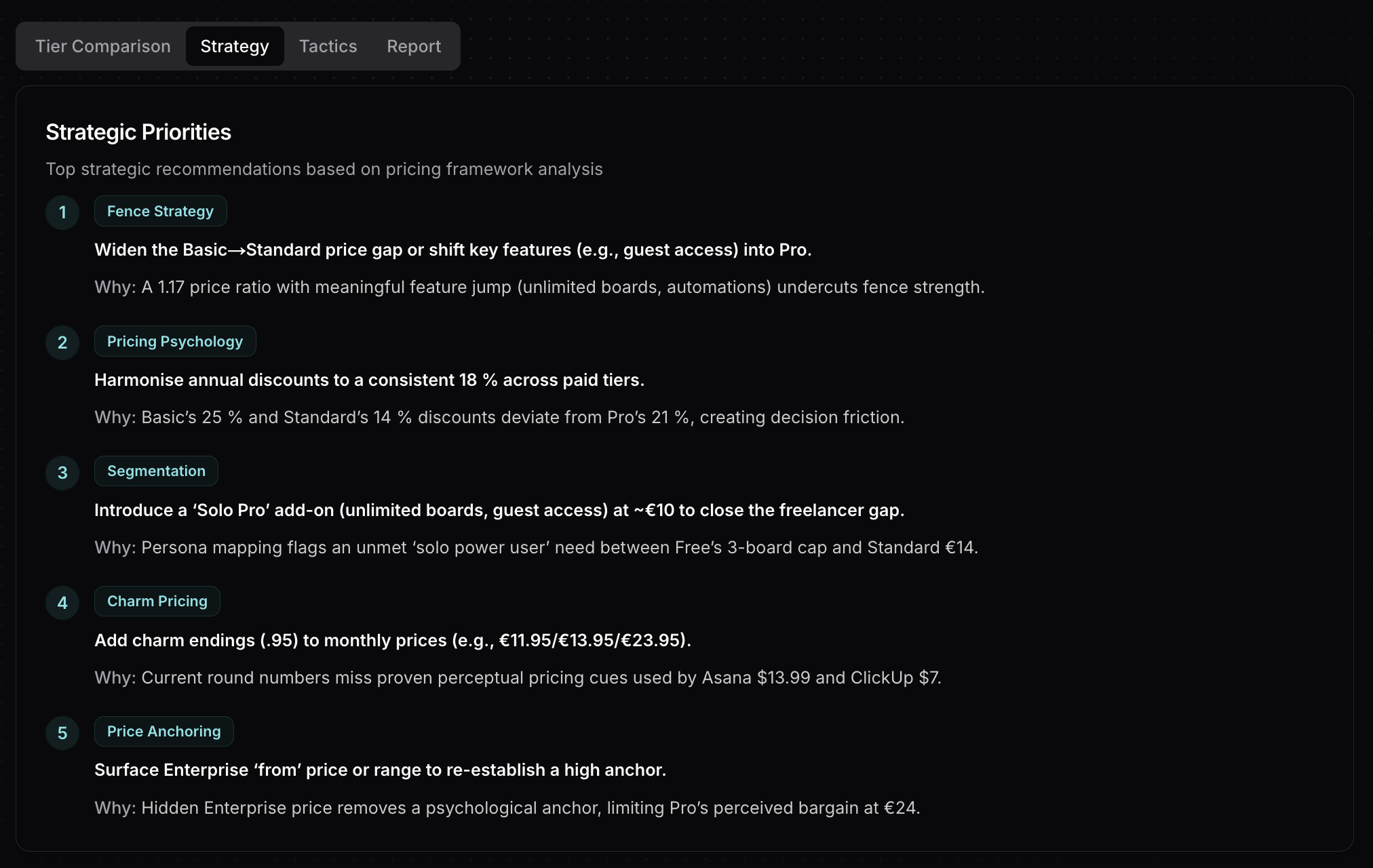 Tierly recommendations dashboard showing AI-generated pricing optimization suggestions for Monday.com
Top Strategic Recommendations for Monday.com
☒ Widen the Basic→Standard price gap or shift key features (like guest access) from Standard to Pro. The current 1.17x step-up ratio (€12 to €14 monthly, or $12 to $14 in USD) creates a weak fence (5/10 strength) despite a meaningful feature jump (unlimited boards, automations, integrations, timeline views). A wider €3-4 gap or moving guest access to Pro would strengthen tier differentiation and reduce down-sell risk. Principle: Fence Strategy.
☒ Harmonize annual discounts to ~18% across all paid tiers. Basic's 25% discount exceeds best practices and signals unnecessary margin give-away, while Standard's 14% makes it appear less attractive. Tierly recommends standardizing around 18% (raising Basic annual from €9 to ~€9.50, lowering Standard annual from €12 to ~€11.20) to create consistent savings expectations and reduce decision friction. Principle: Pricing Psychology.
☒ Introduce a 'Solo Pro' add-on (unlimited boards + guest access) at ~€10/month to close the freelancer gap. Persona mapping identifies an unmet "solo power user" need between Free's 3-board cap and Standard's €14 team-focused pricing. A solo-tier add-on would expand TAM without cannibalizing team-oriented subscriptions. Principle: Segmentation.
☒ Add charm pricing (.95 endings) to monthly prices across all tiers (e.g., €11.95/€13.95/€23.95). Charm pricing is proven to improve price perception and conversion, yet Monday.com uses round numbers that miss this psychological advantage used by competitors like Asana ($13.99) and ClickUp ($7). Small adjustment, measurable lift. Principle: Charm Pricing.
☒ Surface Enterprise 'from' price or range to re-establish a high anchor. Hidden Enterprise pricing removes a psychological reference point that would elevate Pro's €24 monthly price perception. A visible "from €X/user/month" indicator or "starting from 20 seats" guidance would strengthen willingness-to-pay for Pro while reducing Enterprise sales friction. Principle: Price Anchoring.
Clearly, each recommendation maps directly to findings in Tierly's strategic assessment. The fence widening addresses the weak 5/10 Basic-to-Standard barrier. Discount harmonization solves the inconsistent 25%/14%/21% pattern that confuses buyers. The Solo Pro tier fills the identified persona gap for freelancers. Charm pricing would improve the 6.0/10 pricing psychology score. And the Enterprise anchor addresses opacity that drags down the tier's price score (8.1/10, which could be higher with clearer positioning).
Monday.com Pricing FAQ
How much does Monday.com cost per month in 2026?
Is Monday.com's free plan good enough for small teams?
Why does Monday.com require a 3-seat minimum on paid plans?
How does Monday.com pricing compare to Asana and ClickUp?
What is the best Monday.com plan for startups?
What are the best Monday.com alternatives in 2026?
The 5 Pricing Lessons from Monday.com
To summarize what SaaS founders can learn:
✦ Lesson 1: Seat minimums create revenue floors but also conversion cliffs. The jump from 2 free seats to a mandatory 3-seat purchase at $27/month is the steepest entry barrier in the competitive set.
✦ Lesson 2: Multi-product pricing is a retention moat, but without a unified pricing experience (bundle calculator, combination discounts), the complexity becomes a conversion barrier rather than an upsell driver. Tierly's pricing psychology score of 6.0/10 (the lowest strategic dimension) confirms the presentation does not match the product's ambition.
✦ Lesson 3: Inconsistent annual discounts (25%/14%/21%) undermine the tier you most want customers to choose. Standardize discounts and make the savings story consistent across your ladder.
✦ Lesson 4: Feature gating works when it aligns with customer segments, but watch the competitive gap. Locking time tracking behind a $19/seat tier while ClickUp offers it free creates a vulnerability that grows with each competitor improvement.
✦ Lesson 5: Monday.com's Free tier scores 8.1/10 tactically but is strategically "too restrictive." The tight 3-board and 2-seat limits combined with the $27/month entry barrier (3-seat minimum on Basic) create a conversion cliff that can push evaluation users to competitor free tiers before they experience Monday.com's core value.
Monday.com built a $1B+ ARR platform with 245,000 customers using this pricing structure, scoring 7.6/10 overall (8.0 tactical, 7.2 strategic) and tying with Trello for top tactical execution. The multi-product strategy, the seat minimums, the feature gating, and the addition of a "Most Popular" label on Pro are deliberate decisions that optimized for enterprise revenue.
With that in mind, the broader lesson extends beyond any single tactic. In a competitive field clustered from 7.4 to 8.0, understanding why Monday.com made these choices matters more than knowing what they charge. Pricing is not a spreadsheet exercise. It is a strategic language that signals who a product is built for, which customers to attract, and which ones to let walk away. Monday.com's pricing says, clearly, "we are built for teams, not individuals." Whether your own pricing should send that same message depends entirely on who you are building for and what trade-offs between simplicity and revenue you are willing to make.
Learn the 6-attribute scoring system we used to analyze Monday.com's pricing tiers.
Monday.com uses per-seat pricing with usage-capped automations. See how hybrid models compare.
See how Intercom runs two pricing models simultaneously: per-seat for humans, per-resolution for AI.
Related Posts
Slack Pricing Teardown: What SaaS Founders Can Learn
A strategic analysis of Slack's pricing structure using Tierly's competitive intelligence. 5 lessons on collaboration pricing against Zoom, Google Workspace, Webex, and Pumble.
Linear Pricing Teardown: What SaaS Founders Can Learn
A strategic analysis of Linear's pricing structure using Tierly's AI-powered competitive intelligence. Learn what works, what doesn't, and how to apply these lessons to your own SaaS.
Intercom Pricing Teardown: What SaaS Founders Can Learn
A strategic analysis of Intercom's pricing structure using Tierly's competitive intelligence. 5 lessons on pricing AI-powered customer service against Zendesk, Freshdesk, Kustomer, Gorgias, and Dixa.