Linear Pricing Teardown: What SaaS Founders Can Learn
A strategic analysis of Linear's pricing structure using Tierly's AI-powered competitive intelligence. Learn what works, what doesn't, and how to apply these lessons to your own SaaS.
Most Linear pricing guides tell you what each tier costs. This one tells you why those choices matter and what you can steal for your own pricing.
Linear recently reached unicorn status with an $82M Series C at a $1.25B valuation. As they compete head-to-head with Atlassian's Jira, their pricing strategy matters more than ever.
We ran Linear through Tierly's AI-powered pricing analysis, comparing it against Jira, GitHub, GitLab, Shortcut, and Zenhub. The result? A detailed breakdown of where Linear excels, where it struggles, and four strategic lessons every SaaS founder can apply.
What is Linear Pricing?
Linear pricing is the tiered subscription model used by Linear, the purpose-built issue tracking tool for product teams. Unlike traditional per-seat pricing where you pay strictly by user count, Linear pricing uses teams as the primary value metric.
Here's Linear's current pricing structure:
| Tier | Price | Key Limits | Best For |
|---|---|---|---|
| Free | $0 | Unlimited members, 2 teams, 250 issues | Small teams getting started |
| Basic | $10/user/month | 5 teams, unlimited issues | Growing engineering teams |
| Business | $16/user/month | Unlimited teams, private teams | Cross-functional organizations |
| Enterprise | Custom | SSO, SCIM, advanced security | Large organizations |
What makes Linear pricing unusual is the "unlimited members" on the Free tier. Most competitors (Jira, GitHub) limit free users to 10 or fewer. Linear bets that organizational complexity (needing more teams) will drive upgrades, not just headcount.
Linear Pricing in 2026: Key Observations
Linear's pricing has remained stable through early 2026, with no major tier changes since their last restructuring. However, the competitive landscape has shifted:
- AI features are now standard. Linear was early to include AI agents on Free, but competitors are catching up. Jira added Rovo AI across more tiers, and GitHub Copilot continues expanding.
- Usage-based pricing pressure. The industry trend toward usage-based pricing models hasn't hit Linear yet, but tools like GitLab already use compute minutes as a billing dimension.
- Free tier competition intensifying. With more tools offering generous free tiers, Linear's "unlimited members" positioning becomes less unique over time.
Linear Pricing Changes to Watch
Linear has not announced a 2026 pricing revision, but several market signals suggest changes may come. First, GitHub's continued expansion of Copilot into project management (not just code) puts competitive pressure on Linear's AI differentiation. Second, Atlassian's aggressive Jira pricing restructuring in late 2025 reshaped the mid-market. Third, the trend toward per-seat vs usage-based pricing creates strategic tension for Linear's team-based model.
For SaaS founders watching Linear, the key question is whether their "teams as value metric" approach will hold as competitor free tiers become more generous. Our Monday.com teardown shows how seat minimums can create conversion cliffs. Linear avoids this trap with unlimited free members, but the 2-team limit serves the same gating function.
If you are benchmarking against Linear, use competitive pricing analysis software to track tier-level changes rather than relying on manual monitoring.
These trends make Linear's pricing decisions particularly instructive for SaaS founders evaluating their own strategies in 2026.
Now let's dive into how Linear's pricing performs against competitors and what strategic lessons SaaS founders can apply.
The Tierly Analysis: How Linear Stacks Up
We analyzed Linear against five direct competitors in the issue tracking and product development category. Here's what the Tierly analysis found:
Competitive Positioning Analysis
| Product | Tierly Score | Key Strength | Key Weakness |
|---|---|---|---|
| GitLab | 7.0 | End-to-end DevSecOps platform | Complex pricing (compute minutes) |
| GitHub | 6.8 | Developer ecosystem dominance | Limited project management |
| Jira | 6.8 | Enterprise configurability | Overwhelming for small teams |
| Linear | 6.7 | UX and engineering focus | Tier descriptions missing |
| Zenhub | 6.6 | Native GitHub integration | Narrow market position |
| Shortcut | 6.5 | Modern issue tracking | Lower market awareness |
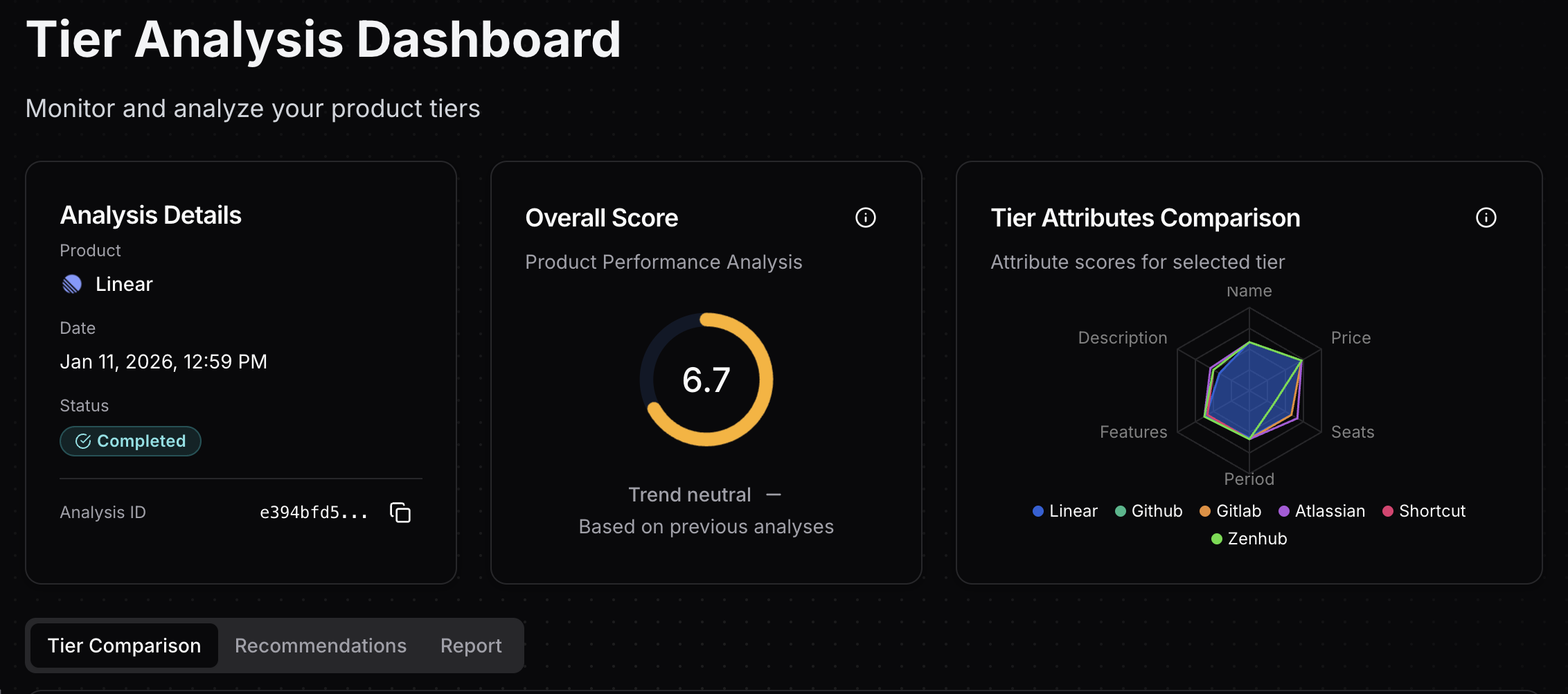 Tierly dashboard showing Linear's 6.7 overall score with competitor radar comparison
Linear ranks #4 overall, which is respectable but reveals something important: Linear's challenge isn't feature depth. It's how they communicate value.
Linear's Tier-by-Tier Breakdown
Tier Score Analysis
| Tier | Score | Strongest Attribute | Weakest Attribute |
|---|---|---|---|
| Free | 7.0 | Price (8.7/10) | Description (5/10) |
| Basic | 6.7 | Period (8.4/10) | Description (2.5/10) |
| Business | 7.0 | Features (8.6/10) | Description (2.5/10) |
| Enterprise | 6.0 | Features (9.3/10) | Seats clarity (4.5/10) |
Notice the pattern? Free and Business tie for highest scores, while Enterprise lags at 6.0/10. The consistent weakness across all tiers is description quality. Linear's pricing page tells you what you get but not why you should care.
Lesson 1: Teams as Your Value Metric
Linear made an unusual choice: they use teams as the primary progression metric rather than pure per-seat pricing.
How Linear's team limits work:
⦿ Free: Unlimited members, but limited to 2 teams and 250 issues
⦿ Basic ($10/user/month): Up to 5 teams, unlimited issues
⦿ Business ($16/user/month): Unlimited teams, plus private teams and guests
Why this matters:
Most issue trackers price per user, period. Jira charges per seat. GitHub charges per seat. Linear adds a dimension: organizational complexity.
This creates interesting dynamics:
-
Small teams benefit. A 5-person startup on Free can have unlimited members across 2 teams. That's genuinely useful.
-
Growth triggers upgrade. When you need a third team (QA, Customer Success, a new product line), you upgrade. This correlates with actual organizational scaling, not just headcount.
-
Large teams pay for structure. Enterprise isn't just about seats. It's about unlimited teams, sub-initiatives, and dashboards for complex organizations.
The best SaaS pricing aligns the unit of value with the unit of measurement. When customers pay for what they use, they feel the pricing is fair.
Founder takeaway: Your value metric should align with how customers actually experience value growth. For Linear, that's organizational complexity (teams), not just headcount.
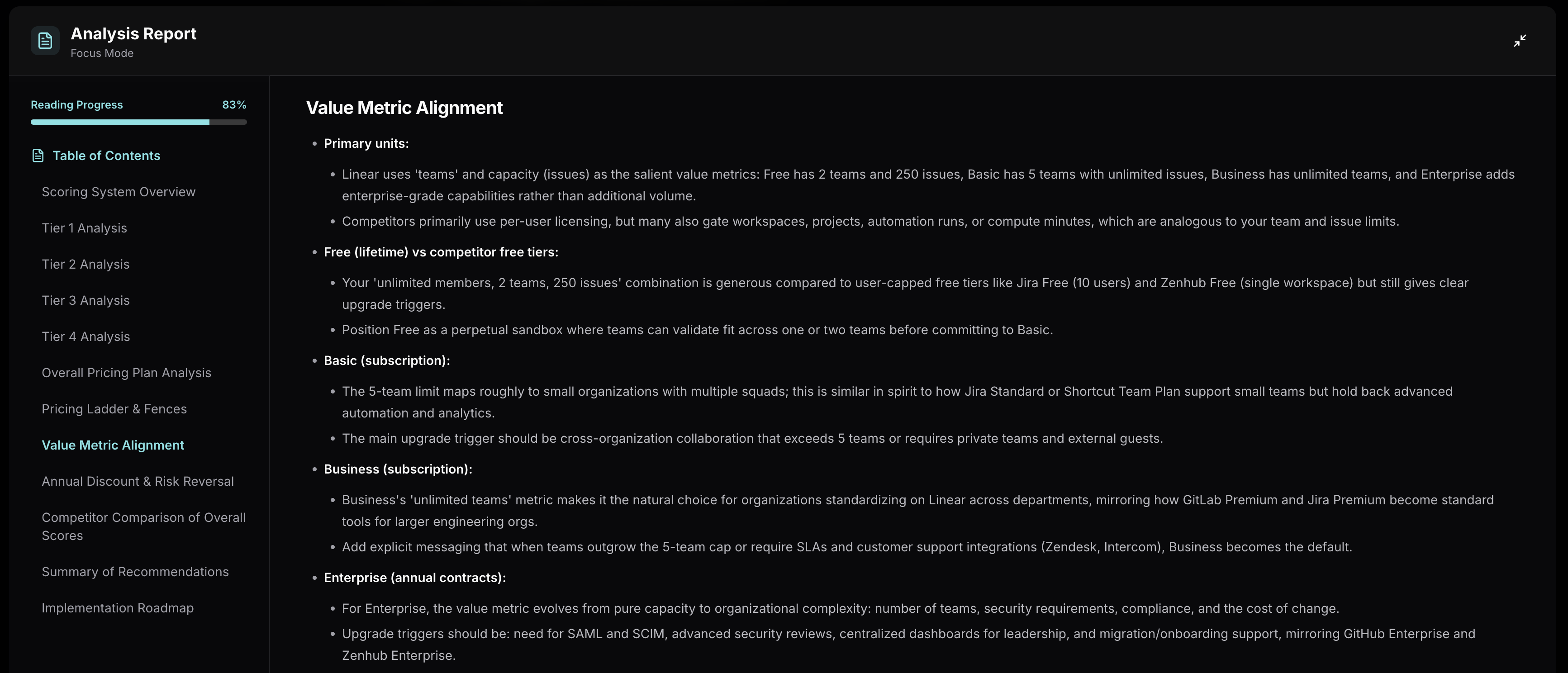 Tierly analysis showing Linear's value metric alignment across pricing tiers
Lesson 2: AI Features on Free (A Bold Bet)
Here's something unusual: Linear includes AI agents on the Free tier.
What competitors do with AI:
| Product | AI Features | Available On |
|---|---|---|
| Jira | Rovo Search, Chat, Agents | Standard+ ($7.91/mo) |
| GitHub | Copilot integration | Separate subscription |
| GitLab | AI Chat, Code Suggestions | Premium+ ($29/yr) |
| Linear | AI agents | Free tier |
| Zenhub | AI suggested labels, Sprint review | Teams ($8.33/yr) |
Linear is the only major player giving AI agents to free users. That's a strategic bet.
The logic:
AI features in issue trackers handle routine work: labeling, triage, duplicate detection. By including these on Free, Linear:
-
Creates stickiness early. Users learn to rely on AI assistance before paying anything.
-
Differentiates on experience. "Linear feels smarter" becomes word-of-mouth.
-
Reduces support burden. AI handles common questions and patterns.
The risk:
Free AI features are expensive. If usage scales faster than conversions, it's a margin problem. Linear is betting that AI becomes table stakes and early adoption wins long-term.
Founder takeaway: Consider which features should build habits (free) vs. which should drive upgrades (paid). AI is often gated as premium, but Linear's bet is that AI-first users become loyal users.
Lesson 3: The Missing Description Problem
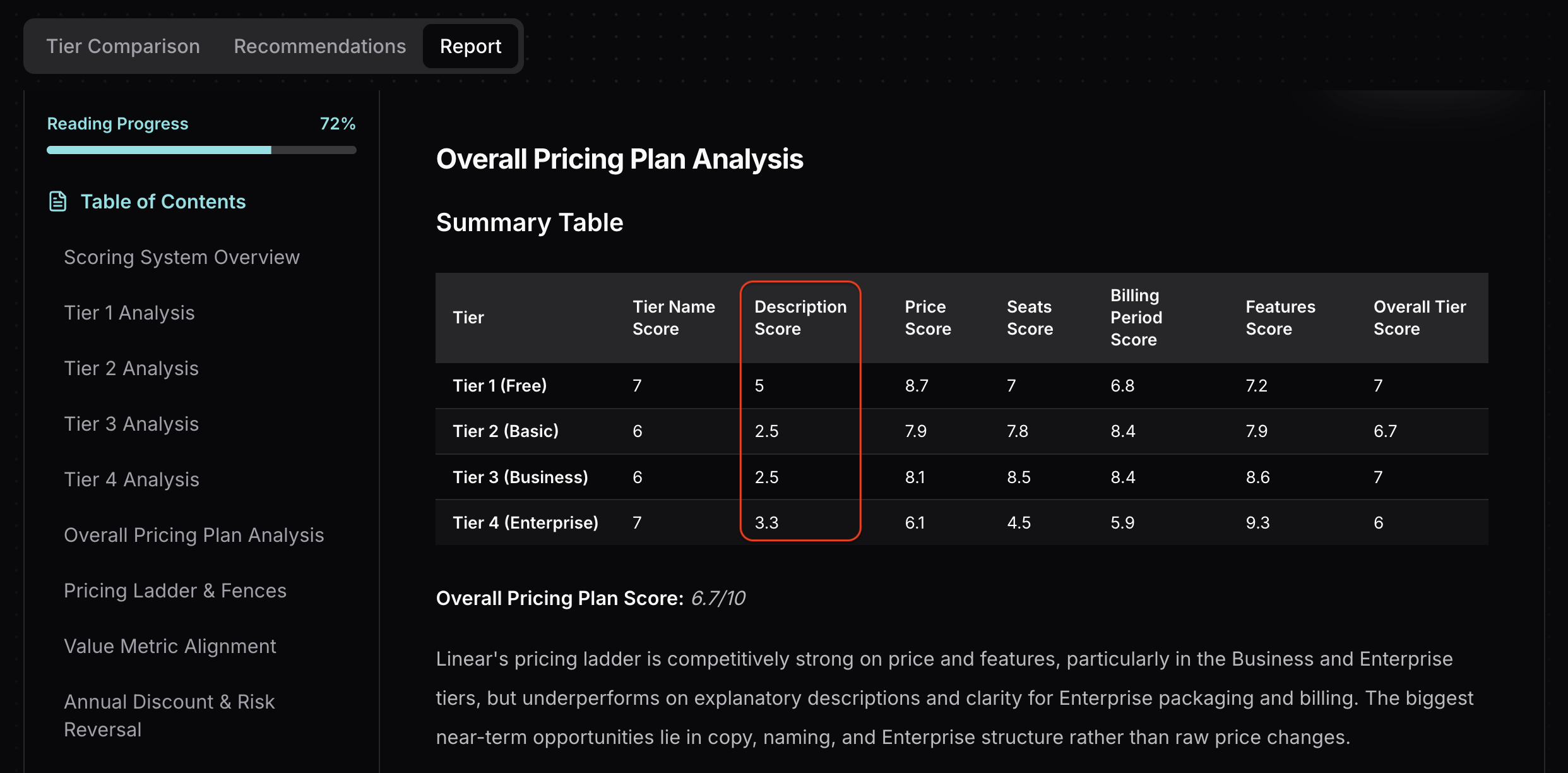 Tierly analysis showing Linear's tier description scores and comparison with competitors
This is Linear's biggest missed opportunity. Look at the description scores:
- Free: 5/10 ("Free for everyone")
- Basic: 2.5/10 (No description at all)
- Business: 2.5/10 (No description at all)
- Enterprise: 3.3/10 (No description)
Compare this to competitors:
⦿ Jira Free: "Free forever for 10 users"
⦿ GitHub Free: "The basics for individuals and organizations"
⦿ Shortcut Free: "Best for teams getting started"
⦿ Zenhub Teams: "Designed for growing teams, with AI-powered tools, automation, and real-time reporting"
Linear's pricing page lists features. It doesn't tell you who each tier is for or why you should choose it. This is a common pattern we see across SaaS pricing. In our n8n pricing teardown, the open-source model creates a different description challenge: explaining why you should pay when the core product is free.
Why this matters for SEO and conversion:
-
Searchers need quick answers. Someone searching "Linear pricing for startups" wants to know which tier fits without reading every feature.
-
Descriptions guide self-selection. "Best for fast-growing teams" helps a 30-person company skip Free without reading bullets.
-
Missing descriptions hurt featured snippets. Google can't pull "Linear Basic is for..." if Linear doesn't say it.
Recommended Description Updates
Based on Tierly's analysis
Free: "For individuals and small teams starting with product development. Unlimited members, core integrations, AI-powered triage."
Basic: "For growing teams that need unlimited issues and admin controls. Best for 5-20 person engineering teams."
Business: "For cross-functional product organizations. Private teams, SLAs, and premium integrations for scaling companies."
Enterprise: "For large organizations requiring advanced security, compliance, and dedicated support. Custom pricing for 100+ seats."
Founder takeaway: Every tier needs a one-sentence description that answers "Who is this for?" Missing descriptions cost you conversions and search visibility.
Lesson 4: Enterprise Transparency Gap
Linear's Enterprise tier scores lowest at 6.0/10. The feature score is excellent (9.3/10), but everything else drags it down.
The problem areas:
- Price score: 6.1/10 (no pricing visibility)
- Period score: 5.9/10 (unclear billing terms)
- Seats score: 4.5/10 (no clarity on minimums)
What Enterprise includes:
- All Business features
- Sub-initiatives
- Advanced Linear Asks
- Dashboards
- SAML and SCIM
- Advanced security
- Migration and onboarding support
These are strong features for large organizations. But potential buyers can't self-qualify. They don't know if Enterprise is $20/seat or $50/seat.
Compare to Jira Enterprise:
Jira uses progressive disclosure for Enterprise pricing. Their pricing page says "Enterprise plan pricing is available when you enter 801 or more users above." Enter 801 users, and you immediately see: "$166,000 per year (User tier: 801-1,000)."
No sales call required. A 900-person company knows their annual budget in seconds.
Compare to GitHub Enterprise:
GitHub publishes Enterprise pricing at $21/seat/month. A 200-person company knows immediately: ~$50K/year. No sales call needed to budget.
Founder takeaway: Custom pricing works for Enterprise, but include anchors. "Starting at $X/seat for organizations over 50" reduces friction without locking you into published rates.
How Linear Compares to Competitors
Tierly's AI matched each Linear tier to equivalent competitor tiers. Here's how they align:
| Linear Tier | Jira | GitHub | GitLab | Shortcut |
|---|---|---|---|---|
| Free ($0) | Free ($0) | Free ($0) | Free ($0) | Free Plan ($0) |
| Basic ($10) | Standard ($7.91) | N/A | N/A | Team Plan ($8.50) |
| Business ($16) | Premium ($14.54) | Team ($4) | Premium ($29/yr) | Business Plan ($12) |
| Enterprise | Enterprise | Enterprise ($21) | Ultimate ($99/yr) | Enterprise Plan |
Key observations:
⦿ Linear's Basic tier is orphaned. GitLab and GitHub don't have comparable mid-tier offerings. Users on those platforms go straight from Free to Business-equivalent tiers. Linear has an extra step in the ladder.
⦿ Linear Business faces tough competition. At $16/month, it competes with Jira Premium ($14.54) and Shortcut Business ($12). GitHub Team at $4/month undercuts everyone, though it's more limited.
⦿ Enterprise is table stakes. All competitors offer SAML, SCIM, and advanced security at the Enterprise level. Linear's differentiator needs to be migration support and UX, not features.
A note on scope: This analysis focused on engineering-first issue trackers (Jira, GitHub, GitLab, Shortcut, Zenhub). General project management tools like ClickUp and Asana serve broader audiences and warrant their own teardowns. For a direct comparison in that space, see our Monday.com pricing teardown, where Monday.com scores 8.0/10 (tactical) against Asana, ClickUp, Trello, Smartsheet, and Wrike.
What Tierly Recommends for Linear
Based on the analysis, Tierly generated specific recommendations for each tier:
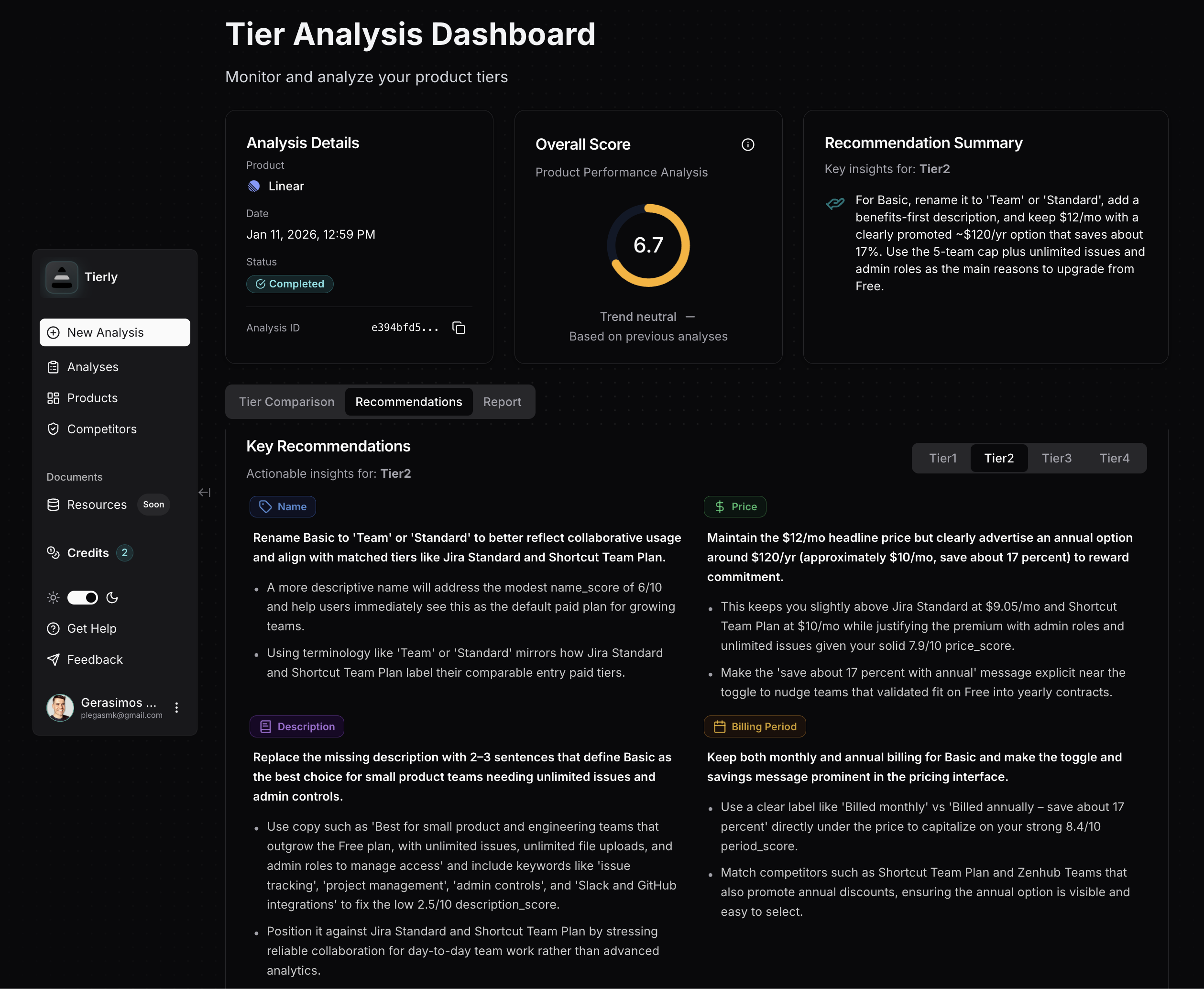 Tierly recommendations dashboard showing AI-generated pricing optimization suggestions for Linear
AI-Generated Recommendations
From Tierly's pricing analysis
For the Free Tier:
Description recommendation: Rewrite from "Free for everyone" to specify audience and value. Example: "Free for individuals and small teams. Unlimited members across 2 teams with AI-powered triage and GitHub/Slack integrations."
Feature messaging: Lead with "AI agents" since this differentiates from every competitor's free tier.
For the Basic Tier:
Description recommendation: Add a description. This tier scores 2.5/10 because it says nothing about who it's for. Recommend: "For growing engineering teams that need unlimited issues, admin controls, and up to 5 teams."
Price positioning: At $10/month vs Jira Standard at $7.91, Linear needs to justify the premium. Emphasize simplicity and UX advantage.
For the Business Tier:
Description recommendation: Same issue. Add clear audience targeting: "For cross-functional product organizations. Private teams, Issue SLAs, and enterprise integrations."
Feature reordering: Lead with Triage Intelligence and Linear Insights (unique features) rather than "All Basic features +".
For Enterprise:
Price recommendation: Add "starting at" ranges. "Custom pricing starting at $X/seat for organizations over 100" helps mid-market companies budget without requiring immediate sales contact.
Seats clarity: State minimum seat requirements explicitly rather than "N/A".
Linear Pricing FAQ
What is Linear pricing?
How much does Linear cost in 2026?
What's the best Linear plan for startups?
How does Linear pricing compare to Jira?
Why does Linear use teams instead of seats for pricing?
Does Linear include AI features in the free plan?
Is Linear good for small teams?
Is Linear better than Asana?
Has Linear changed pricing in 2026?
Get instant access to Linear's current pricing tiers, features, and competitive positioning data.
The 4 Pricing Lessons from Linear
To summarize what SaaS founders can learn:
✦ Lesson 1: Use a value metric that aligns with how customers experience value growth. Linear chose teams (organizational complexity) over pure headcount, creating natural upgrade triggers.
✦ Lesson 2: Consider which features should build habits vs. drive upgrades. Linear's bet on free AI agents creates early stickiness and differentiation.
✦ Lesson 3: Every tier needs a clear "who is this for?" description. Linear's missing descriptions cost them conversions and SEO visibility.
✦ Lesson 4: Custom Enterprise pricing works, but include anchors. "Starting at" ranges help mid-market buyers self-qualify without a sales call.
Linear built a $2B+ company with this pricing structure. It's not perfect. The description gaps and Enterprise opacity leave money on the table. But understanding why they made these choices helps you make better decisions for your own product.
Learn the fundamentals of pricing intelligence and how to build a systematic approach to tracking competitors.
See how Notion structures their pricing and what lessons apply to your SaaS.
How Airtable prices its no-code platform against open-source competitors.
How Intercom structures pricing for customer service with AI copilots, usage-based billing, and add-on modules.
How Monday.com uses seat minimums and multi-product pricing. Compare project management pricing strategies.
Compare tools for analyzing competitor pricing tiers and feature packaging.
How n8n prices workflow automation with an open-source core model.
Related Posts
Monday.com Pricing Teardown: What SaaS Founders Can Learn
A strategic analysis of Monday.com's pricing structure using Tierly's competitive intelligence. 5 lessons on pricing a multi-product work platform against Asana, ClickUp, Trello, Smartsheet, and Wrike.
Airtable Pricing Teardown: What SaaS Founders Can Learn
A strategic analysis of Airtable's pricing structure using Tierly's AI-powered competitive intelligence. Learn what works, what doesn't, and how to apply these lessons to your own SaaS.
n8n Pricing Teardown: What SaaS Founders Can Learn
A strategic analysis of n8n's pricing structure using Tierly's AI-powered competitive intelligence. Learn what works, what doesn't, and how to apply these lessons to your own SaaS.