Airtable Pricing Teardown: What SaaS Founders Can Learn
A strategic analysis of Airtable's pricing structure using Tierly's AI-powered competitive intelligence. Learn what works, what doesn't, and how to apply these lessons to your own SaaS.
Most Airtable pricing guides tell you what each tier costs. This one tells you why those choices matter and what you can steal for your own pricing.
Airtable sits in a unique position in the no-code space. It's the market leader in collaborative databases, used by over 500,000 organizations, but it competes against a wave of open-source alternatives that undercut it on price by 50-70%. How do you defend premium pricing when free alternatives keep getting better?
We ran Airtable through Tierly's AI-powered pricing intelligence analysis, comparing it against five database-first competitors: Baserow, NocoDB, SeaTable, Grist, and Retable. The result? Airtable ranks #4 overall, and the reasons reveal five strategic lessons every SaaS founder can apply.
What is Airtable Pricing?
Airtable pricing is the tiered subscription model used by Airtable, the no-code app builder and collaborative relational database. Unlike simpler database tools that charge flat rates, Airtable prices per editor and uses records per base, automation runs, and AI credits as the primary usage metrics that gate each tier.
Here's Airtable's current pricing structure:
| Tier | Price (Annual) | Key Limits | Best For |
|---|---|---|---|
| Free | $0 | 1,000 records/base, 5 editors, 100 automations | Individuals and small teams |
| Team | $20/user/mo | 50,000 records/base, 25,000 automations | Teams building shared workflows |
| Business | $45/user/mo | 125,000 records/base, 100,000 automations, SSO | Departments needing admin controls |
| Enterprise Scale | Custom | 500,000 records/base, HyperDB, audit logs | Large organizations with governance needs |
What makes Airtable pricing interesting isn't the price points. It's how they defend premium positioning against alternatives that cost a fraction of the price. The five database-first competitors Tierly analyzed range from free open-source tools to paid platforms at $10-24/user/month, all offering similar core capabilities.
Why these competitors? Tierly's algorithm selected database-first platforms that directly overlap with Airtable's core use case: building relational databases, views, automations, and internal apps without code. This excludes broader work management tools like Notion, ClickUp, or monday.com, which compete with Airtable on some use cases but serve fundamentally different primary workflows. The all-in-one platforms (Notion, ClickUp, Smartsheet, SmartSuite, monday.com) were identified in our broader competitor research, but for a fair pricing comparison, database-first tools provide the most meaningful benchmark.
Now let's dig into how Airtable's pricing performs and what SaaS founders can learn.
The Tierly Analysis: How Airtable Stacks Up
We analyzed Airtable against five direct competitors in the database-first no-code platform category. Here's what Tierly's analysis found:
Competitive Positioning Analysis
| Product | Tierly Score | Key Strength | Key Weakness |
|---|---|---|---|
| Baserow | 7.6 | Open-source + aggressive pricing | Smaller feature set (3 tiers) |
| NocoDB | 7.6 | Unlimited seats on paid plans | Newer, smaller ecosystem |
| SeaTable | 7.4 | Data sovereignty + self-hosting | European pricing (EUR) |
| Grist | 7.4 | Spreadsheet-database hybrid | Lower market awareness |
| Airtable | 7.3 | Feature depth + AI integration | Price perception (5/10 on Business) |
| Retable | 7.2 | Simple entry pricing | Only 2 tiers (no free plan) |
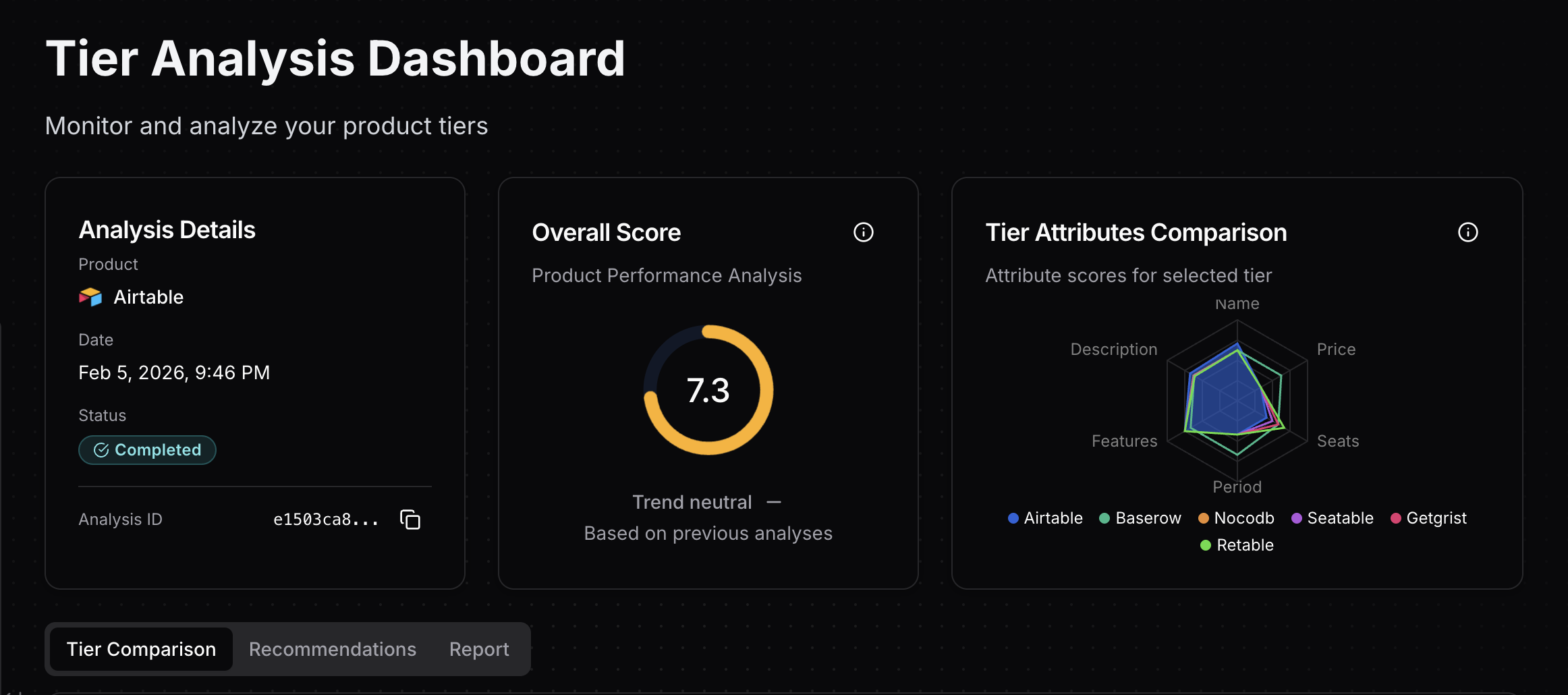 Tierly dashboard showing Airtable's 7.3 overall score with competitor comparison
Airtable ranks #4, which might surprise some. But the scores reveal a clear pattern: Airtable wins on features and loses on price perception. Every competitor undercuts Airtable on price while approaching parity on core database capabilities. The question for founders isn't "Is Airtable a good product?" (it clearly is) but "Does the pricing structure communicate that value effectively?"
Airtable's Tier-by-Tier Breakdown
Tier Score Analysis
| Tier | Score | Strongest Attribute | Weakest Attribute |
|---|---|---|---|
| Free | 7.8 | Price (9/10) | Features (7/10) |
| Team | 7.6 | Period (8.5/10) | Price (6.5/10) |
| Business | 7.2 | Features (8.5/10) | Price (5/10) |
| Enterprise Scale | 6.6 | Features (9/10) | Price (4/10) |
The pattern is unmistakable. As you move up Airtable's pricing ladder, features get stronger (7 to 9) while price perception gets weaker (9 to 4). This isn't unusual for premium products, but the steepness of the drop, combined with open-source competitors offering similar governance features at a fraction of the price, creates real pressure on mid-tier conversion.
Want to score your own pricing page like we scored Airtable's? Get an instant grade across 5 key dimensions. No signup required.
Lesson 1: Premium Pricing in an Open-Source Market
Airtable's biggest strategic challenge is price positioning. At $20-45/user/month, it costs 2-3x more than direct database-first competitors.
The price landscape:
| Tier Level | Airtable | Baserow | NocoDB | SeaTable | Grist |
|---|---|---|---|---|---|
| Free | $0 | $0 | $0 | $0 | $0 |
| Mid-tier | $20/mo | $10/mo | $12/mo | €7/mo | $8/mo |
| Business | $45/mo | $18/mo | $24/mo | €14/mo | $24/mo |
| Enterprise | Custom | $22/mo | Custom | Custom | Custom |
Airtable's Team tier at $20/month sits 67-150% above comparable mid-tier competitors. Business at $45/month is 88-150% more expensive than matched tiers. These aren't small gaps.
Why Airtable can get away with it (for now):
⦿ Ecosystem depth. 15,000 AI credits per user, 25,000 automation runs, Extensions, Gantt views, and standard sync integrations give Team more capabilities than any competitor's mid-tier.
⦿ Brand and trust. 500,000+ organizations, enterprise customers across media, retail, finance, and healthcare. Baserow and NocoDB are growing fast but haven't reached this scale.
⦿ Interface Designer and Portals. These features have no direct equivalent in most open-source alternatives. They turn Airtable from "a database" into "an app-building platform."
Where the strategy is vulnerable:
The Business tier's 5/10 price score is the clearest warning sign. At $45/month, Airtable Business costs nearly twice what NocoDB Business and Grist Business charge, with NocoDB Business including SAML SSO. SeaTable Enterprise includes SSO, unlimited rows, and automations for just €14/month.
When competitors offer the same compliance features at less than a third of the price, Airtable's Business tier needs to justify itself through capabilities that open-source can't match, not through table-stakes features like SSO.
The single most important decision in evaluating a business is pricing power. If you've got the power to raise prices without losing business to a competitor, you've got a very good business.
Founder takeaway: If you're a premium player in a market with open-source alternatives, your pricing can't rest on feature parity alone. Gate genuinely unique capabilities (AI, app-building, advanced integrations) behind paid tiers, and make sure your mid-tier doesn't compete on compliance features that cheaper competitors also include.
Lesson 2: AI Credits as a Pricing Differentiator
Here's what sets Airtable apart from every competitor in this analysis: integrated AI credits across every tier, including Free.
AI credit allocation by tier:
| Airtable Tier | AI Credits/User/Month | Competitor AI Credits |
|---|---|---|
| Free | 500 | Grist Free: 100 (one-time) / Others: None |
| Team | 15,000 | SeaTable Enterprise: 500 / Others: None |
| Business | 20,000 | Most competitors: None |
| Enterprise Scale | 25,000 | Most competitors: None |
Airtable is the only platform in this comparison that includes AI capabilities at every tier. Grist offers 100 one-time AI assistant credits on Free and monthly credits starting at Pro. SeaTable includes 500 AI credits per user, but only on their Enterprise tier (€14/month). Baserow, NocoDB, and Retable don't include AI credits at all.
Why this matters strategically:
-
Habit formation on Free. 500 AI credits per editor per month means new users immediately experience AI-powered features. By the time they need more, they're hooked.
-
Natural upsell trigger. The jump from 500 to 15,000 credits (Free to Team) is massive. Users who hit the 500-credit limit on Free have a clear reason to upgrade beyond just records and automations.
-
Competitive moat. Open-source competitors can replicate views, automations, and even SSO. Replicating a deeply integrated AI layer with thousands of credits per user is significantly harder and more expensive.
The risk:
AI credits are expensive to deliver. If users consume 15,000-25,000 credits per month at scale, the unit economics could pressure margins. Airtable is betting that AI becomes the primary value driver that justifies premium pricing, not just a bonus feature.
Founder takeaway: If you have a capability that competitors can't easily replicate, build it into every tier. Airtable's AI credits create both a habit loop (Free users try it) and a value ladder (power users need more). This is how you defend premium pricing: not through feature parity, but through features your competitors don't have at all.
Lesson 3: Records-Per-Base as the Value Metric
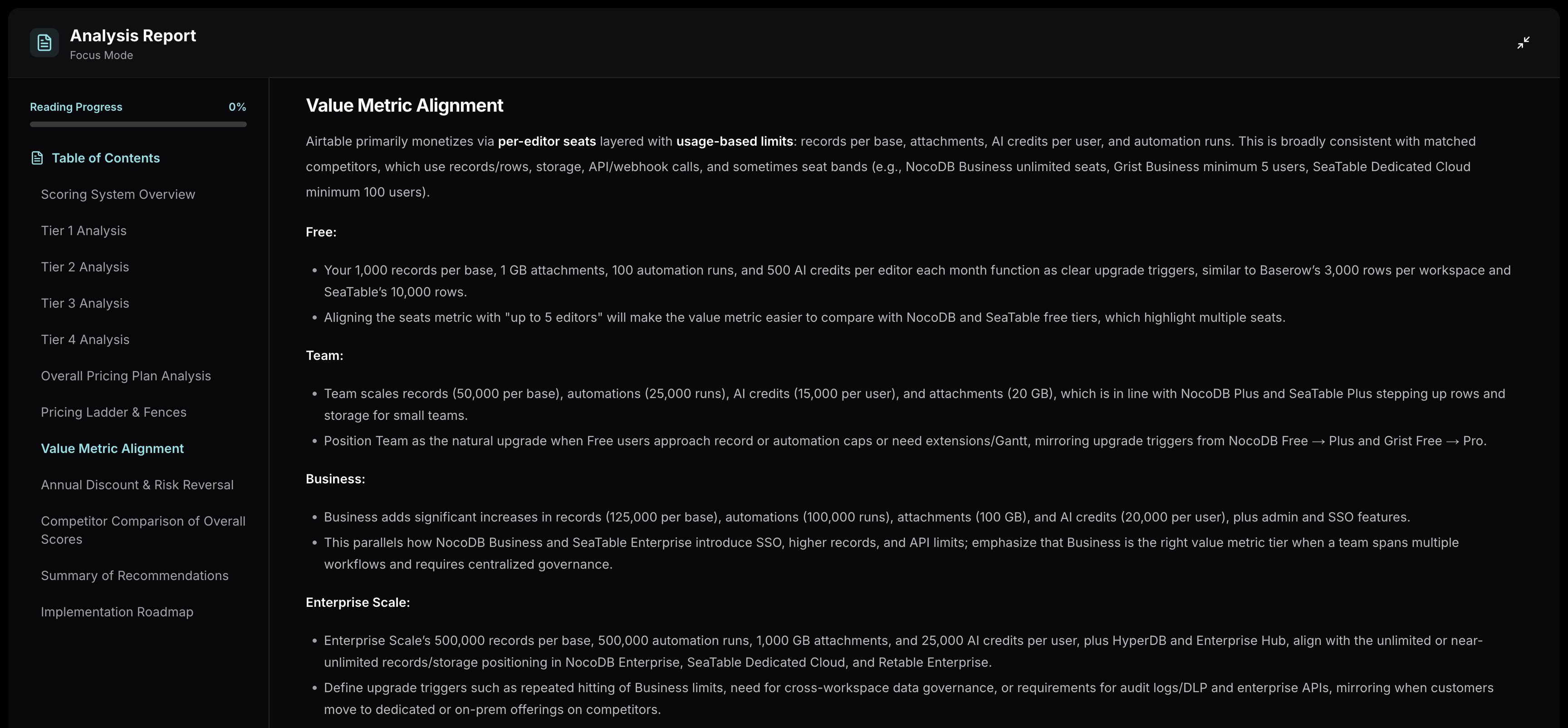 Tierly analysis showing Airtable's value metric alignment across tiers
Airtable uses a multi-dimensional value metric: per-editor pricing layered with records per base, automation runs, AI credits, and attachment storage. But the primary progression metric, the one that drives most upgrades, is records per base.
Records-per-base progression:
⦿ Free: 1,000 records per base (with unlimited bases)
⦿ Team: 50,000 records per base (50x increase)
⦿ Business: 125,000 records per base (2.5x increase)
⦿ Enterprise Scale: 500,000 records per base (4x increase)
Why records-per-base works:
This metric aligns pricing with actual data growth. A marketing team tracking 500 campaigns won't hit the Free limit for months. A product team managing 5,000 feature requests hits the Free ceiling fast. The upgrade trigger correlates with how much value you're getting from the platform, not just how many people are logged in.
Compare this to competitors:
- Baserow: 3,000 rows per workspace (Free) to 250,000 (Advanced). Workspace-level, not per-base.
- NocoDB: 1,000 records (Free) to 300,000 (Business) to unlimited (Enterprise).
- SeaTable: 10,000 rows (Free) to unlimited (Enterprise at €14/mo).
The key difference: SeaTable and NocoDB offer unlimited rows at their mid-to-upper tiers. Airtable caps records even on Enterprise Scale (500,000 per base). For teams managing large datasets, this cap becomes a meaningful consideration, especially when SeaTable Enterprise offers unlimited rows at €14/user/month.
Founder takeaway: Choose a value metric that tracks real usage growth, not just seat count. Records-per-base works because it maps to data complexity. But be careful with hard caps on upper tiers when competitors offer unlimited alternatives. If your enterprise customers are comparing your 500K cap against a competitor's "unlimited," the cap becomes a sales objection, not a revenue lever.
Lesson 4: The Enterprise Transparency Problem
Airtable's Enterprise Scale tier is a study in contradictions. It has the best features in the analysis (9/10) but the worst overall score (6.6/10).
Enterprise Scale attribute scores:
- Features: 9/10 (HyperDB, Enterprise Hub, Enterprise API, audit logs, DLP)
- Name: 8.5/10 ("Enterprise Scale" is distinctive and clear)
- Description: 8.1/10 (communicates governance and scale)
- Period: 5/10 (billing period listed as "N/A")
- Seats: 5/10 (no minimum or typical range communicated)
- Price: 4/10 (no anchoring whatsoever)
This is the same pattern we identified in the Linear pricing teardown and the n8n pricing teardown: world-class features undermined by opaque commercial terms.
What makes Airtable's case worse:
Baserow Advanced, Airtable's closest Enterprise competitor in this analysis, publishes pricing at $18/month (annual). A 200-person company can budget $43,200/year for Baserow without a single sales call. For Airtable Enterprise Scale? They have no idea if they're looking at $50K or $500K.
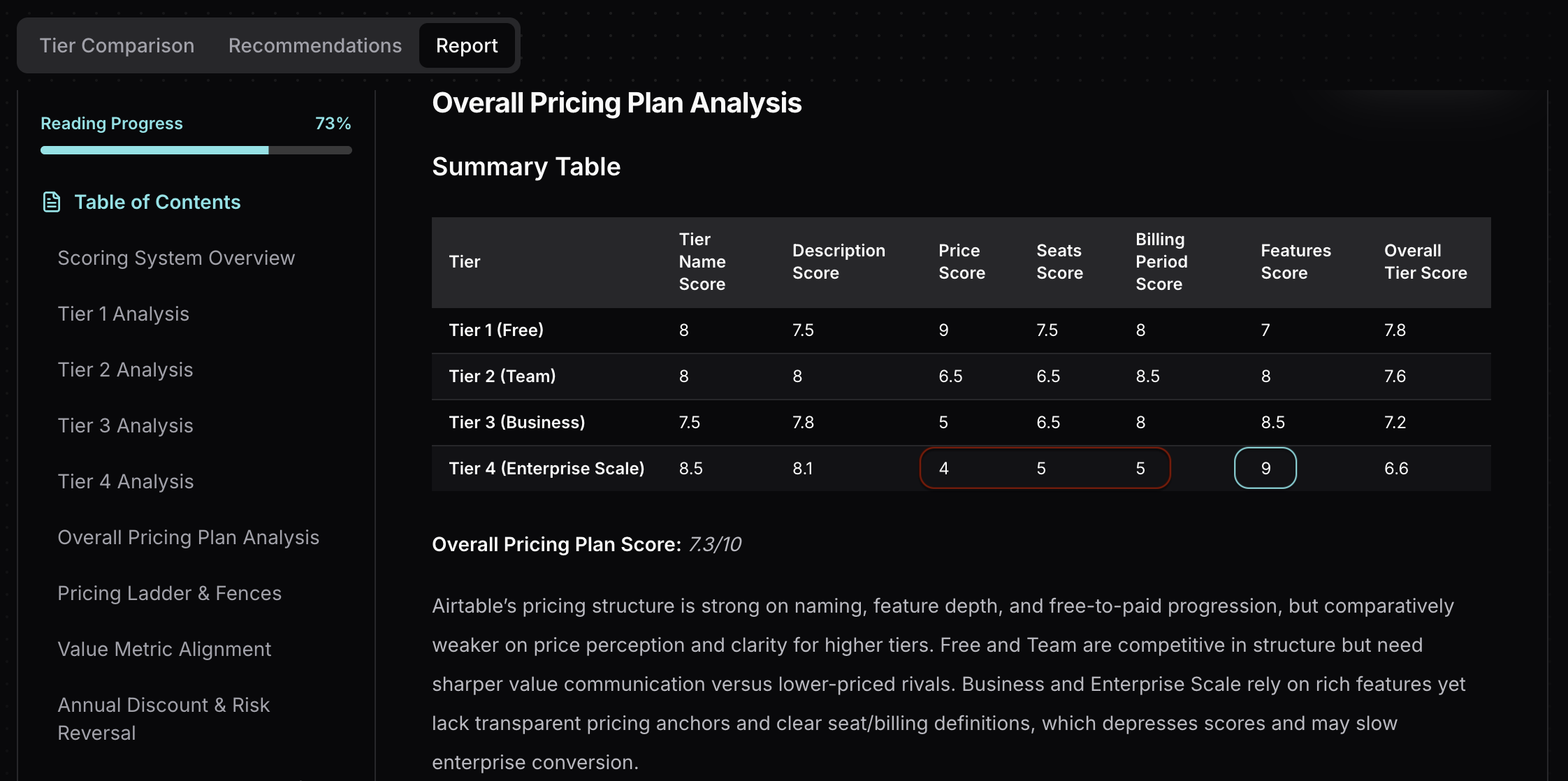 Tierly analysis showing Enterprise Scale feature strength vs commercial term weakness
Compare to competitors on enterprise transparency:
| Product | Top Tier | Price Published? | Billing Clarity | Seat Minimums |
|---|---|---|---|---|
| Baserow | Advanced | Yes ($18/mo) | Annual | Per user |
| NocoDB | Enterprise | No (Contact Sales) | Not stated | Unlimited seats |
| SeaTable | Dedicated Cloud | No (Contact Sales) | Annual billing stated | Min 100 users |
| Grist | Enterprise | No (Contact Sales) | Not stated | Not stated |
| Retable | Enterprise | No (Contact Sales) | Not stated | Unlimited |
| Airtable | Enterprise Scale | No (Contact Sales) | Not stated | Not stated |
Baserow stands alone in publishing enterprise pricing. SeaTable at least states the 100-user minimum and annual billing requirement. Airtable gives enterprise buyers nothing to self-qualify with.
Founder takeaway: Enterprise buyers have budgets to defend internally. "Contact Sales" without any anchor forces them to schedule a call before they can even determine if you're in their budget range. Add "starting at" ranges, state the billing period (annual/multi-year), and define minimum seat bands. This reduces friction without committing to published rates.
Lesson 5: Usage-Based Fences That Drive Upgrades
Airtable's fence strategy is one of the most layered in the no-code space. Rather than relying on a single feature gate, Airtable stacks multiple usage dimensions that trigger upgrades at different points for different user types.
Airtable's multi-dimensional fences:
| Fence Type | Free | Team | Business | Enterprise Scale |
|---|---|---|---|---|
| Records/base | 1,000 | 50,000 | 125,000 | 500,000 |
| Automation runs | 100 | 25,000 | 100,000 | 500,000 |
| AI credits/user | 500 | 15,000 | 20,000 | 25,000 |
| Attachments/base | 1 GB | 20 GB | 100 GB | 1,000 GB |
| SSO | No | No | SAML | SAML + enhanced |
| Admin controls | No | No | Admin panel | Enterprise Hub |
This creates multiple upgrade triggers. A data-heavy team hits record limits first. An automation-heavy team hits automation caps first. An AI-heavy team runs out of credits first. Each team type discovers a different reason to upgrade, which means Airtable captures diverse upgrade paths instead of relying on a single gate.
✦ The Free-to-Team Fence
The jump from Free to Team ($0 to $20/user/month) is primarily driven by:
- Records: 1,000 to 50,000 per base (50x increase)
- Automations: 100 to 25,000 runs (250x increase)
- AI credits: 500 to 15,000 (30x increase)
- Views: Gantt and timeline view unlock
This is a strong fence. Users on Free experience genuine value, and when they hit limits, the upgrade is justified by massive capacity increases across every dimension.
✦ The Team-to-Business Fence
The jump from Team to Business ($20 to $45/user/month, a 125% increase) is driven by:
- SAML SSO (compliance requirement)
- Admin panel and AI admin controls
- Premium sync integrations and two-way sync
- Verified data and App Sandbox
- Records: 50,000 to 125,000 per base
This is where Airtable's pricing faces the most pressure. The competitive pricing tools in this space show that SSO appears at much lower price points: SeaTable includes SSO at €14/month, NocoDB Business includes SSO at $24/month, and Baserow doesn't offer SSO in its current tiers but prices its top tier at just $18/month.
When the primary upgrade trigger is a compliance feature (SSO) rather than a capability feature, users feel they're paying more for IT requirements, not for doing better work. This is the same dynamic we saw in the Notion pricing teardown, where SSO gating pushed Business to its lowest price perception score.
AI-Generated Recommendations
From Tierly's pricing analysis
For the Free Tier:
Feature messaging: Lead with "500 AI credits per editor each month," "Interface Designer," and "100 automation runs" before listing record and storage caps. These differentiate Airtable's Free from every competitor's Free tier.
Seats clarity: Replace the ambiguous seats field with explicit text like "Includes up to 5 editors" to match how NocoDB and SeaTable communicate their free-tier generosity.
For the Team Tier:
Price positioning: Test a stronger annual discount (closer to 20% vs the current 17%) to narrow the gap with NocoDB Plus ($12/month) and SeaTable Plus (€7/month) while maintaining premium positioning.
Feature ordering: Lead with "50,000 records per base," "25,000 automation runs," and "15,000 AI credits per user" before listing views and integrations. These numbers justify the premium.
For the Business Tier:
Price perception: The 5/10 price score indicates significant friction. Consider either a modest price reduction (to ~$49/month) or explicitly quantified ROI messaging that connects the premium to admin time saved, consolidated integrations, and security improvements.
Feature grouping: Bundle SAML SSO, Admin panel, AI Admin controls, and App Sandbox under a "Security & Governance" heading. Bundle premium sync, two-way sync, and verified data under "Connected Data." This makes the value structure visible.
For Enterprise Scale:
Price anchoring: Add a visible "starting at" or range-based price anchor. Even "typically 2-3x the cost of a comparable Business deployment" gives budget owners something to work with.
Billing period: State explicitly that Enterprise Scale is sold on annual or multi-year contracts. The current "N/A" billing period hurts buyer confidence.
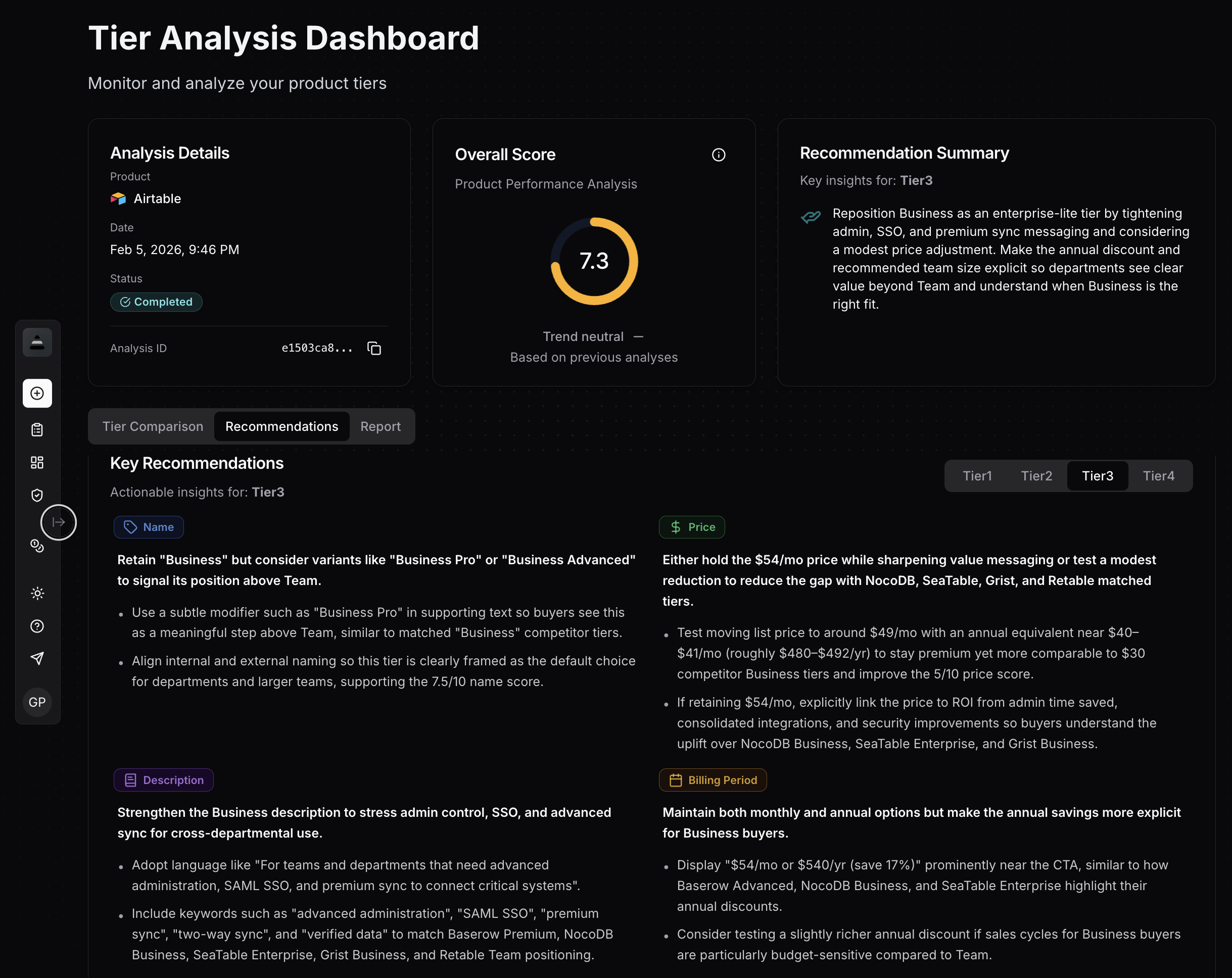 Tierly recommendations dashboard showing AI-generated pricing optimization suggestions for Airtable
Founder takeaway: Multi-dimensional fences (records + automations + AI credits + storage) are more effective than single-feature gates because they capture diverse user types. But watch the Team-to-Business jump: if the primary upgrade trigger is compliance (SSO) rather than capability, the price premium feels like a tax rather than an investment.
How Airtable Compares to Competitors
Tierly's AI matched each Airtable tier to equivalent competitor tiers. Here's how they align:
| Airtable Tier | Baserow | NocoDB | SeaTable | Grist | Retable |
|---|---|---|---|---|---|
| Free ($0) | Free ($0) | Free ($0) | Free ($0) | Free ($0) | No free tier |
| Team ($20) | No match | Plus ($12) | Plus (€7) | Pro ($8) | No match |
| Business ($45) | Premium ($10) | Business ($24) | Enterprise (€14) | Business ($24) | Team ($10) |
| Enterprise Scale | Advanced ($18) | Enterprise | Dedicated Cloud | Enterprise | Enterprise |
Key observations:
⦿ Airtable's Business tier faces the toughest competition. At $45/month, it's matched against Baserow Premium ($10), NocoDB Business ($24), SeaTable Enterprise (€14), Grist Business ($24), and Retable Team ($10). Every competitor delivers SSO and advanced features at a fraction of the price.
⦿ Enterprise Scale has the most defensible position. HyperDB, Enterprise Hub, Enterprise API, and the named "Enterprise Governance & Scale" bundle have no direct equivalents in most competitors. Baserow Advanced at $18/month is the closest on pricing, but can't match Airtable's enterprise feature depth.
⦿ Open-source self-hosting is the wild card. Baserow, NocoDB, SeaTable, and Grist all offer self-hosted options. For organizations that prioritize data sovereignty or want to avoid per-seat costs entirely, self-hosting can eliminate ongoing SaaS fees. Airtable has no self-hosted option, which means its pricing must consistently justify managed-service value.
Airtable Pricing FAQ
How much does Airtable cost per year?
Is Airtable worth the cost?
What are Airtable's free plan limits?
How does Airtable pricing compare to Baserow and NocoDB?
What is Airtable Enterprise pricing?
Is Airtable better than Notion for databases?
What are the best Airtable alternatives in 2026?
The 5 Pricing Lessons from Airtable
To summarize what SaaS founders can learn:
✦ Lesson 1: Premium pricing against open-source competitors requires unique capabilities, not just feature parity. Airtable defends its 2-3x premium through AI integration, Interface Designer, and Portals. If your premium is built on features competitors also include (like SSO), the value argument weakens.
✦ Lesson 2: Integrate AI into every tier, including Free. Airtable's AI credits create habit formation on Free, natural upsell triggers, and a competitive moat that open-source alternatives can't easily replicate.
✦ Lesson 3: Choose a value metric that tracks real usage growth. Records-per-base maps directly to data complexity and organizational scale. But cap upper tiers carefully when competitors offer "unlimited" at lower prices.
✦ Lesson 4: Enterprise features can't fix opaque commercial terms. Airtable Enterprise Scale scores 9/10 on features but 6.6/10 overall because pricing, billing period, and seat minimums aren't communicated. Budget owners need anchors to self-qualify.
✦ Lesson 5: Multi-dimensional fences (records + automations + AI credits + storage) capture diverse upgrade paths. But watch the compliance-vs-capability balance. If your biggest tier jump is driven by SSO rather than power-user features, the premium feels like a tax.
Learn the fundamentals of pricing intelligence and how to build a systematic approach to tracking competitors.
See how Notion structures their pricing and what lessons apply to your SaaS.
How Linear prices its project management tool and what SaaS founders can learn from it.
Related Posts
Monday.com Pricing Teardown: What SaaS Founders Can Learn
A strategic analysis of Monday.com's pricing structure using Tierly's competitive intelligence. 5 lessons on pricing a multi-product work platform against Asana, ClickUp, Trello, Smartsheet, and Wrike.
Intercom Pricing Teardown: What SaaS Founders Can Learn
A strategic analysis of Intercom's pricing structure using Tierly's competitive intelligence. 5 lessons on pricing AI-powered customer service against Zendesk, Freshdesk, Kustomer, Gorgias, and Dixa.
n8n Pricing Teardown: What SaaS Founders Can Learn
A strategic analysis of n8n's pricing structure using Tierly's AI-powered competitive intelligence. Learn what works, what doesn't, and how to apply these lessons to your own SaaS.