n8n Pricing Teardown: What SaaS Founders Can Learn
A strategic analysis of n8n's pricing structure using Tierly's AI-powered competitive intelligence. Learn what works, what doesn't, and how to apply these lessons to your own SaaS.
Most n8n pricing guides list what each plan costs. This one tells you why those pricing choices matter and what you can apply to your own product.
We ran n8n through Tierly's AI-powered pricing intelligence analysis, comparing it against Zapier, Make, Pipedream, Windmill, and Activepieces. The result? n8n ranks #1 overall, but the analysis reveals a pricing structure with one of the most extreme price jumps we've ever seen, a brilliant execution-based billing model, and an Enterprise tier that underperforms despite world-class features.
Five lessons. All backed by data. All applicable to your SaaS.
The Tierly Analysis: How n8n Stacks Up
We analyzed n8n against five direct competitors in the workflow automation and iPaaS category. Here's what the AI found:
Competitive Positioning Analysis
| Product | Tierly Score | Key Strength | Key Weakness |
|---|---|---|---|
| n8n | 7.6 | Execution-based pricing + features | Business tier price perception |
| Windmill | 7.1 | Open-source self-host + enterprise | Smaller integration library |
| Pipedream | 7.0 | Deep code-first environment | No self-hosting option |
| Make | 7.0 | Visual builder + affordable entry | Operation-based cost scaling |
| Zapier | 6.9 | 8,000+ integrations | Per-task pricing at scale |
| Activepieces | 6.2 | Open-source, unlimited runs | Newer, less mature platform |
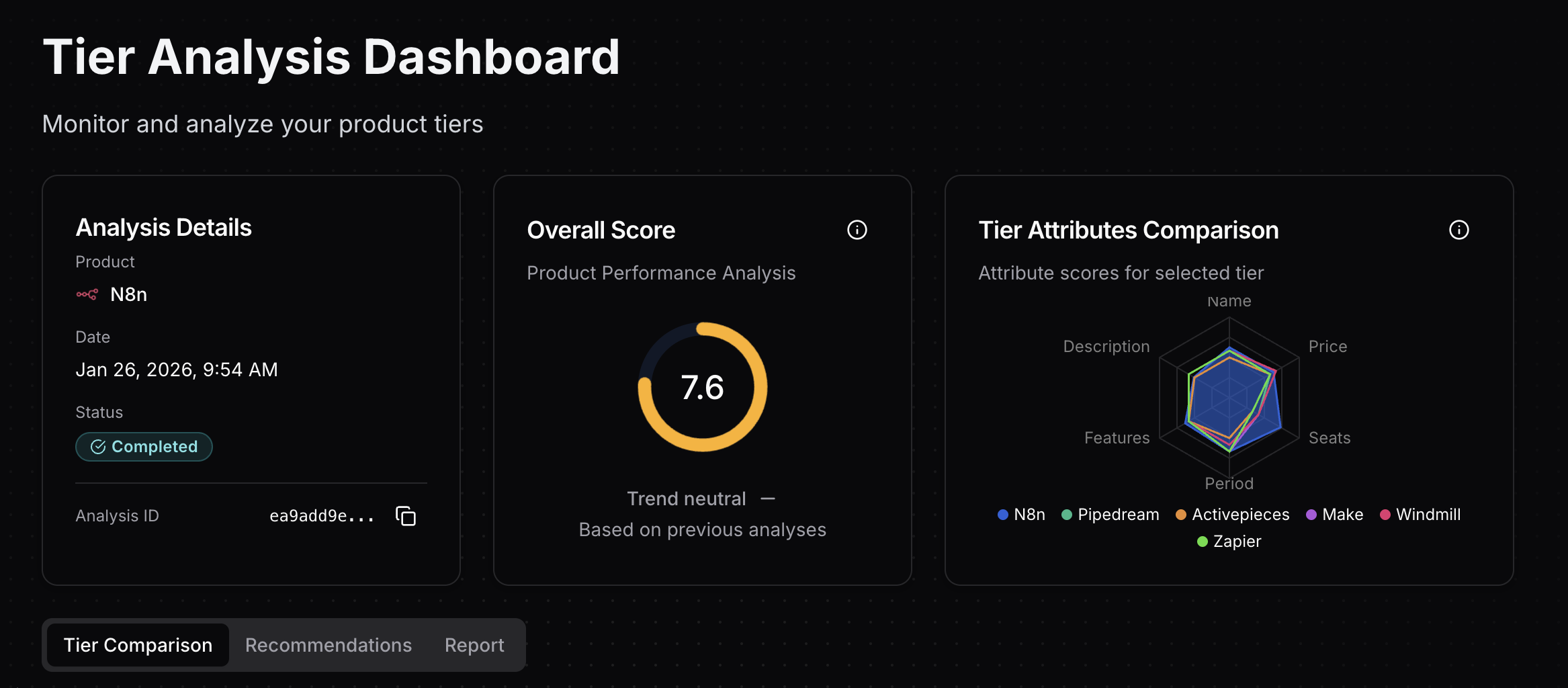 Tierly dashboard showing n8n's 7.6 overall score with competitor radar comparison
n8n takes the top spot, and it's not just because of features. The score reflects a pricing structure that genuinely aligns with how technical teams think about value. Execution-based billing, generous workflow allowances, and a self-hostable Community Edition create a package that's hard for competitors to match on paper.
But the scores also reveal where n8n leaves money on the table. The Business tier's price perception and the Enterprise tier's vague commercial terms drag down what could be an even stronger overall position.
n8n's Tier-by-Tier Breakdown
Tier Score Analysis
| Tier | Score | Strongest Attribute | Weakest Attribute |
|---|---|---|---|
| Starter ($24/mo) | 7.6 | Seats/Capacity (8.8/10) | Description (6.1/10) |
| Pro ($60/mo) | 7.9 | Features (8.4/10) | Description (7.1/10) |
| Business ($800/mo) | 7.8 | Features (8.9/10) | Price (6.7/10) |
| Enterprise (Custom) | 6.9 | Features (9.6/10) | Price (5.0/10) |
The pattern is clear. n8n's features get stronger as you move up the ladder (from 7.6 to 9.6), but price perception gets weaker (from 7.6 to 5.0). That divergence tells you everything about where the pricing strategy works and where it breaks.
Pro stands out as the sweet spot. At 7.9/10, it's the highest-scoring tier in the entire analysis. If you're a technical team evaluating n8n, Pro is where the value proposition clicks.
Lesson 1: Execution-Based Pricing Changes Everything
Most workflow automation platforms charge per task (Zapier) or per operation (Make). Every node, every step, every data transformation counts against your quota. A 10-step workflow that runs once costs you 10 tasks on Zapier.
n8n flips this. One workflow execution = one count. Whether your workflow has 2 nodes or 50, it's one execution. This is a fundamental pricing architecture decision, and it shows up in the scores.
Why this matters for pricing perception:
⦿ Predictable costs at scale. A team running complex, multi-step automations can forecast their monthly bill without counting individual steps. Zapier users running branching workflows often discover their task usage is 5-10x what they expected.
⦿ Alignment with customer value. Users think in terms of "I automated this process," not "this automation used 14 tasks." n8n's billing model matches how customers experience the product.
⦿ Competitive positioning built into the model. n8n's Pro tier ($60/mo for 10,000 executions) undercuts Zapier Team ($103.50/mo) and Pipedream Advanced ($74/mo) while offering a fundamentally more generous counting method.
The insight for founders:
n8n's pricing model isn't just a billing detail. It's a competitive weapon. By charging per workflow execution rather than per step, n8n turns every complex automation into a value argument: "You'd pay 10x for this on Zapier."
The Pro tier's 7.9/10 score (the highest in the analysis) reflects this. The combination of execution-based billing, 10K monthly executions, and admin/collaboration features creates strong perceived value, which is exactly what your competitive pricing strategy should aim for.
In a great market -- a market with lots of real potential customers -- the market pulls product out of the startup.
n8n found that market pull by pricing in a way that makes switching from per-task platforms feel like an obvious upgrade. The pricing model itself becomes part of the product-market fit.
Founder takeaway: Your billing metric shapes perception more than your actual price point. Choose a unit that aligns with how customers experience value, not how your infrastructure tracks usage.
Lesson 2: The $800 Cliff Between Pro and Business
Here's the number that jumps off the page: n8n's Pro-to-Business price jump is +1,233%. That's $60/mo to $800/mo.
For context, the steepest jump we found in the Notion pricing teardown was 104% (Plus to Business). n8n's jump is nearly 12x larger.
Price Ladder Analysis
| Tier | Monthly Price | Annual Price | Jump from Previous |
|---|---|---|---|
| Starter | $24/mo | $20/mo ($240/yr) | First paid tier |
| Pro | $60/mo | $50/mo ($600/yr) | +150% from Starter |
| Business | $800/mo | $667/mo ($8,004/yr) | +1,233% from Pro |
| Enterprise | Custom | Custom | N/A |
The Business tier's price score (6.7/10) reflects this problem directly. Features score 8.9/10. The product delivers. But the price perception undermines it.
What triggers the Business upgrade:
- SSO, SAML, and LDAP (compliance requirement)
- Git-based version control (DevOps workflow)
- Multiple environments (staging/production separation)
- 40,000 workflow executions (4x Pro's capacity)
- 30 days of insights (vs. 7 days on Pro)
These are real, high-value features. But the jump from $60 to $800 creates what we call the "missing middle." Teams that outgrow Pro's 10,000 executions but can't justify $800/mo have no landing zone.
Compare this to competitors:
- Pipedream: Basic ($45/mo) to Advanced ($74/mo) = +64%
- Make: Core ($10.59/mo) to Teams ($34.12/mo) = +222%
- Zapier: Professional ($29.99/mo) to Team ($103.50/mo) = +245%
Even Zapier's steepest jump (245%) is a fraction of n8n's 1,233%.
Founder takeaway: Price jumps over 300% need a bridge. Consider introducing a "Pro Plus" or "Growth" tier in the $150-300/mo range with 20-25K executions, SSO, and basic environments. This gives growing teams a natural next step without the sticker shock.
Lesson 3: When Open Source IS Your Free Tier
Here's something unique about n8n: there is no free cloud tier. While Zapier, Make, Pipedream, and Windmill all offer free plans on their cloud platforms, n8n starts at $24/mo.
But n8n has something none of those competitors can match: a fully functional, self-hostable Community Edition with unlimited executions. Free forever. No workflow caps. No execution limits.
This is a deliberate strategic choice, and it works differently from a traditional freemium model.
The dual-funnel strategy:
⦿ Funnel 1: Developer self-hosters. Technical teams discover n8n, self-host the Community Edition, build workflows, and become deeply invested. When they need collaboration, SSO, or managed infrastructure, they evaluate n8n Cloud's paid plans. The switching cost is near zero because they're already on n8n.
⦿ Funnel 2: Cloud buyers with trials. Teams that want managed infrastructure can try any n8n Cloud tier with a free trial before committing. Unlike competitors with permanent free tiers that create qualification friction, n8n's trial-first approach means everyone evaluating the product experiences the full paid feature set immediately.
⦿ The genius of it. Self-hosting creates the habit formation that most SaaS companies achieve with a free tier, but without the hosting costs. n8n doesn't pay to host free users. The community does it themselves. And for cloud evaluators, free trials remove friction without creating a "free forever" segment that never converts.
The trade-off:
Not having a permanent free cloud tier means n8n loses some casual evaluators who want to automate light workflows indefinitely without paying. Zapier's free tier (100 tasks/month) captures these users. n8n accepts this trade-off because their target audience (technical teams) either self-host the Community Edition or have real budgets for paid tools.
This is also why n8n's Starter tier scores 8.8/10 on capacity. At 2,500 executions with unlimited users, it's not a toy tier. It's a production-ready entry point for cloud buyers who have validated n8n through self-hosting, trials, or word of mouth.
Founder takeaway: If your product can be self-hosted, open source can replace a traditional free tier. You get habit formation without hosting costs. But this only works if your target audience is technical enough to self-host. For non-technical buyers, free trials can bridge the gap without creating a permanent free user base.
Lesson 4: Your Middle Tier Should Be the Hero
n8n's Pro tier scores 7.9/10, making it the highest-scoring tier across all six products in the analysis. That's not an accident. It's smart pricing architecture.
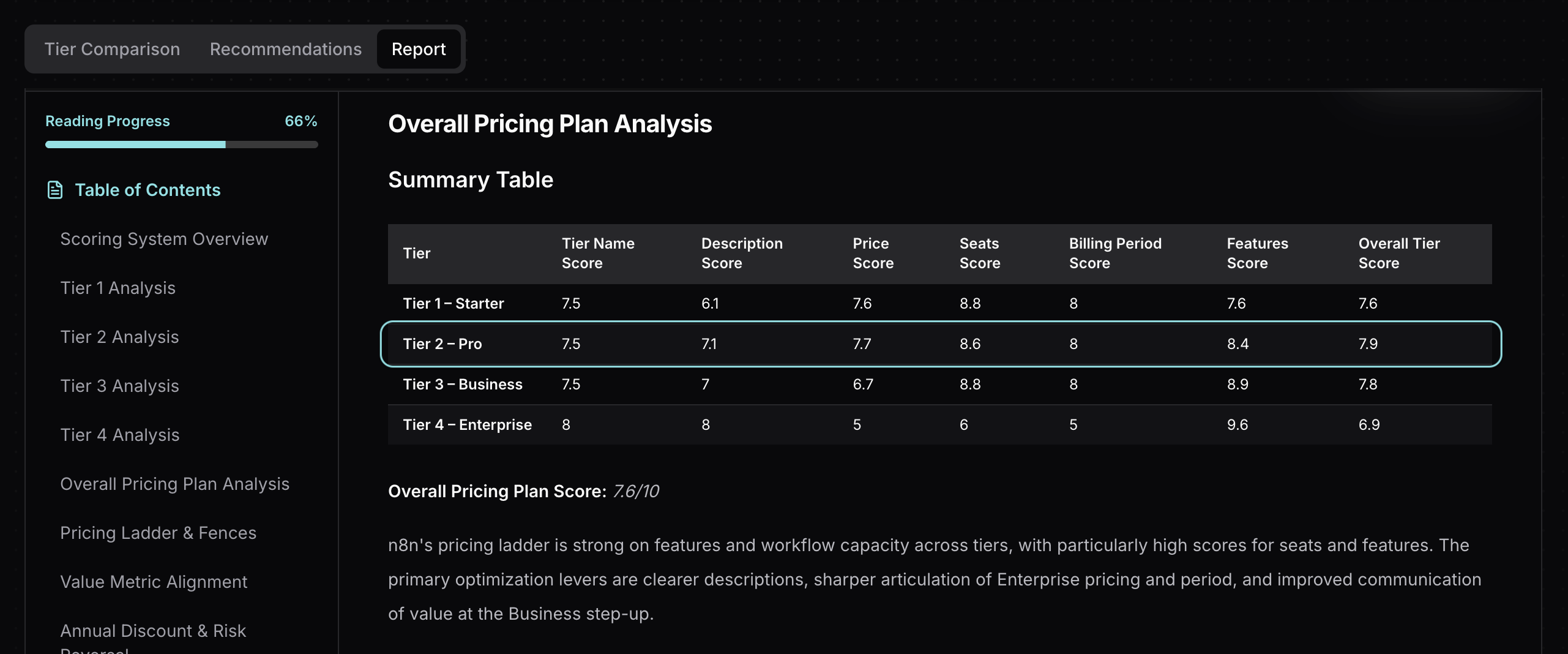 Tierly analysis showing n8n's Pro tier as the highest-scoring plan
Why Pro works so well:
⦿ Price anchoring. At $60/mo, Pro sits between Starter ($24) and Business ($800). The massive gap above makes Pro feel like the obvious choice. This is textbook price anchoring: the expensive option makes the middle option look like a bargain.
⦿ Feature completeness. Pro includes admin roles, workflow history, execution search, 7 days of insights, and 20 concurrent executions. For most small-to-mid teams, this is everything they need. There's no "oh, I need that one feature from Business" moment for 80% of buyers.
⦿ Competitive positioning. Pro undercuts Pipedream Advanced ($74/mo), Zapier Team ($103.50/mo), and Make Teams ($34.12/mo but with operation-based billing that scales unpredictably). When prospects compare competitive pricing tools side by side, Pro wins on both price and billing model.
⦿ Value metric alignment. 10,000 executions per month covers most production workloads for teams of 5-20 people. The quota feels generous rather than limiting.
The insight for founders:
Your middle tier shouldn't just exist between two other tiers. It should be the tier you want most customers to buy. n8n's Pro is designed to capture the majority of paying customers, while Starter captures the price-sensitive and Business captures the compliance-driven.
Tierly's recommendation: Label Pro as "Most Popular" and visually emphasize it on the pricing page. The scores support this positioning.
Founder takeaway: Design your middle tier to be genuinely complete for 80% of your target market. Then use your top tier as an anchor that makes the middle feel like a deal. The best pricing ladder isn't a smooth staircase. It's a sweet spot with clear steps above and below.
Lesson 5: Features Can't Fix Vague Commercial Terms
n8n's Enterprise tier is a study in contrasts. It scores 9.6/10 on features. That's the highest feature score of any tier across all six competitors. The capabilities are genuinely impressive:
- 200+ concurrent executions
- 365 days of insights
- 1,000 AI Workflow Builder credits
- External secret store integration
- Log streaming
- Extended data retention
- Dedicated support with SLA
- Invoice billing
And yet, Enterprise scores just 6.9/10 overall, the lowest tier in n8n's lineup. What goes wrong?
Price score: 5.0/10. Enterprise pricing is listed as "Contact Sales" with no anchoring whatsoever. No "starting at" range. No per-seat estimate. Nothing for budget owners to work with.
Period score: 5.0/10. The billing period is listed as "N/A." Enterprise buyers expect annual contracts, but n8n doesn't say that explicitly. The ambiguity hurts.
Seats score: 6.0/10. While n8n Enterprise includes unlimited users (like all n8n tiers), the pricing page doesn't explicitly state this. The analysis captured ambiguous data, which reflects a documentation clarity issue rather than a product limitation. Enterprise buyers scanning the page expect to see "unlimited users" called out prominently alongside other enterprise features.
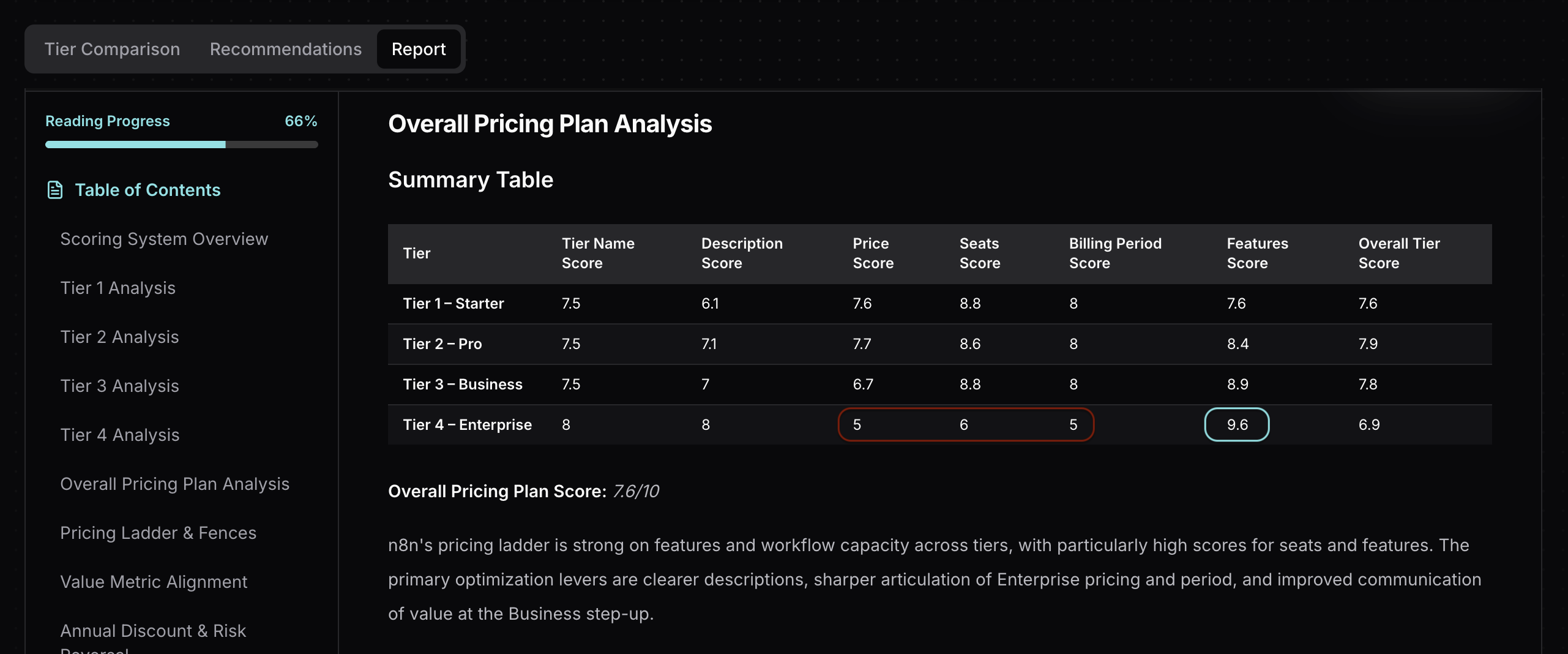 Tierly Enterprise tier analysis showing feature strength vs commercial term weakness
Compare to competitors:
- Windmill Enterprise: $840/mo or $8,400/yr (clearly stated), includes dedicated workers, unlimited features, 24/7 support with 3h response time. Everything is explicit.
- Zapier Enterprise: Custom pricing, but clearly describes "unlimited users," "annual task limits," and "Technical Account Manager." The commercial structure is transparent even without a listed price.
n8n's Enterprise has better features than both. But Windmill and Zapier communicate their commercial terms more explicitly, which builds buyer confidence in the early research phase.
Founder takeaway: Enterprise buyers have budgets to defend internally. "Contact Sales" without any anchor forces them to schedule a call before they can even determine if you're in their budget range. Add "starting at $X/year for organizations over 50 employees" and explicitly list key commercial terms like "unlimited users" and "annual contracts" to reduce friction without committing to public pricing.
How n8n Compares to Competitors
Tierly's AI matched each n8n tier to equivalent competitor tiers. Here's how they align:
| n8n Tier | Zapier | Make | Pipedream | Windmill |
|---|---|---|---|---|
| Starter ($24/mo) | Professional ($29.99/mo) | Core ($10.59/mo) | Basic ($45/mo) | Team ($10/mo) |
| Pro ($60/mo) | Team ($103.50/mo) | Teams ($34.12/mo) | Advanced ($74/mo) | No match |
| Business ($800/mo) | No match | No match | Connect ($150/mo) | No match |
| Enterprise (Custom) | Enterprise (Custom) | Enterprise (Custom) | Business (Custom) | Enterprise ($840/mo) |
Key observations:
⦿ n8n's Business tier has almost no direct competitor matches. At $800/mo, it sits in a price range that most competitors skip entirely. Pipedream Connect ($150/mo) is the closest, but it serves a different use case (embedded integrations, not team automation). This "no match" pattern reinforces the missing-middle problem.
⦿ n8n's Starter and Pro are competitively priced. Starter at $24/mo undercuts Pipedream Basic ($45/mo) and Zapier Professional ($29.99/mo). Pro at $60/mo undercuts both Pipedream Advanced ($74/mo) and Zapier Team ($103.50/mo). The execution-based model makes these comparisons even more favorable.
⦿ Enterprise is feature-rich but commercially opaque. Windmill is the only competitor with transparent Enterprise pricing ($840/mo). n8n, Zapier, Make, and Pipedream all use custom pricing. But Windmill's transparency gives it a structural advantage in early-stage evaluations.
What Tierly Recommends for n8n
Based on the analysis, Tierly generated specific recommendations for each tier. Here's a sample:
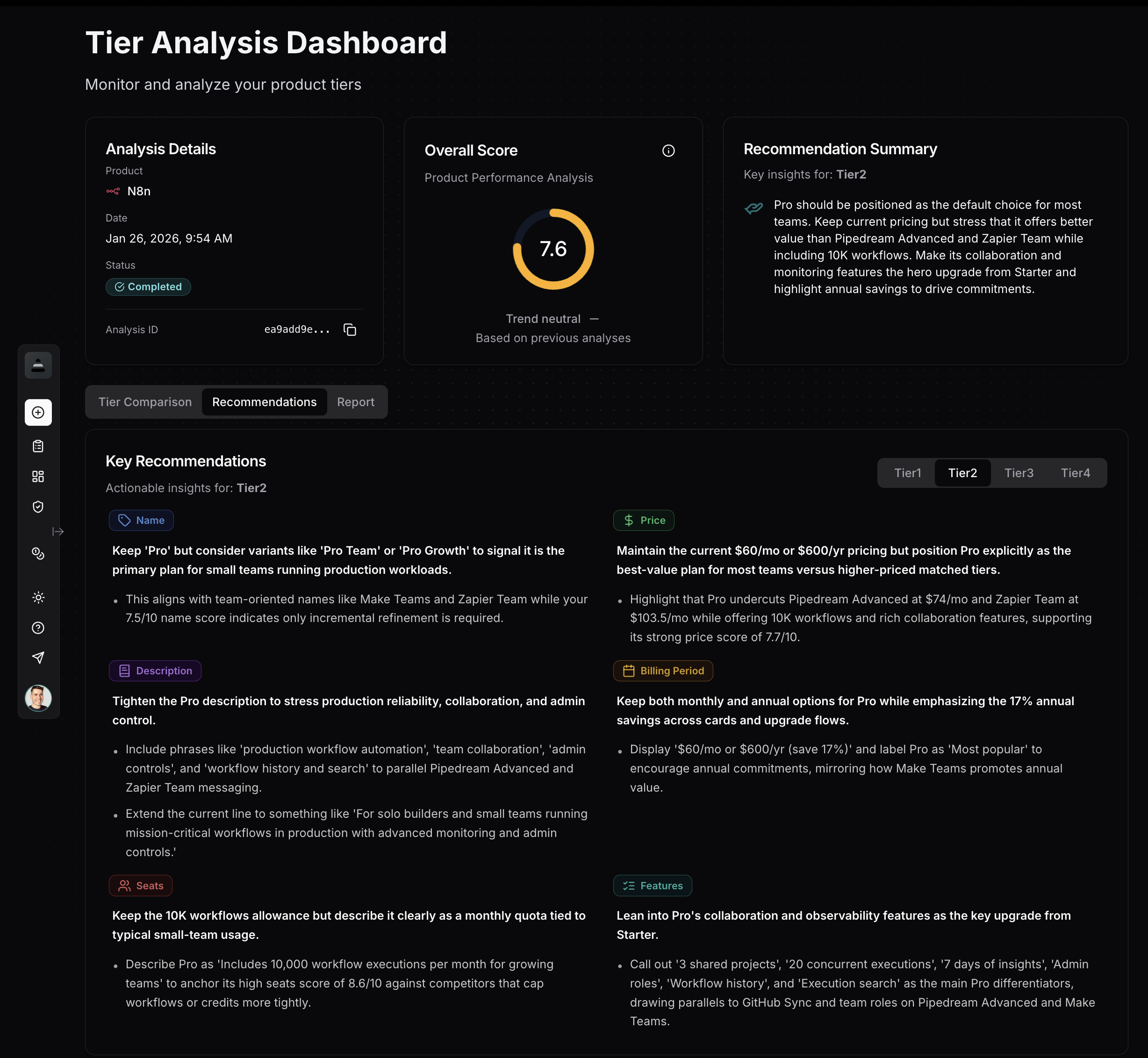 Tierly recommendations dashboard showing pricing optimization suggestions for n8n
AI-Generated Recommendations
From Tierly's pricing analysis
For the Starter Tier:
Description recommendation: Rewrite the description from the generic "Great for getting started and seeing the power of n8n" to something benefit-specific like "For small teams automating workflows with 2,500 monthly executions, unlimited users, and AI workflow building." The current description scores just 6.1/10.
Price recommendation: Keep the $24/mo price point but make the 17% annual savings more prominent. Display pricing as "$24/mo or $20/mo billed annually (save 17%)" with a visual toggle.
For the Pro Tier:
Positioning recommendation: Label Pro as "Most Popular" and visually emphasize it on the pricing page. At 7.9/10, it's n8n's strongest tier and should be treated as the default recommendation.
Feature recommendation: Group features under clear headings like "Collaboration" (shared projects, admin roles) and "Monitoring" (workflow history, execution search, 7 days of insights) rather than a flat list.
For the Business Tier:
Price recommendation: Consider introducing a bridge tier at $150-300/mo with 20-25K executions, SSO, and basic environments to address the 1,233% jump from Pro. Alternatively, reframe Business as a clearly enterprise-adjacent plan with explicit ROI messaging.
Description recommendation: Replace "For companies with < 100 employees needing collaboration and scale" with security-and-governance-first language like "For teams that need SSO, Git-based version control, and production environments at scale."
For Enterprise:
Price recommendation: Add "starting at" ranges in sales collateral to help mid-market companies budget. State explicitly that Enterprise uses custom annual contracts.
Period recommendation: Define Enterprise as "Annual or multi-year contract" rather than showing "N/A" for the billing period. This single change could improve the period score from 5.0 to 7.0+.
Clarity recommendation: Explicitly state "Unlimited users" in the Enterprise feature list. While this is true of all n8n tiers, enterprise buyers specifically look for this confirmation when comparing vendors.
n8n Pricing FAQ
How much does n8n cost in 2026?
What's the best n8n plan for small teams?
Why is n8n's Business plan so expensive?
How does n8n's pricing compare to Zapier and Make?
What is execution-based pricing in workflow automation?
The 5 Pricing Lessons from n8n
To summarize what SaaS founders can learn:
✦ Lesson 1: Your billing metric shapes perception more than your price point. n8n's execution-based model (pay per workflow run, not per step) creates a structural pricing advantage that competitors can't match without rebuilding their entire billing system.
✦ Lesson 2: Price jumps over 300% need a bridge tier. n8n's 1,233% jump from Pro ($60) to Business ($800) creates a "missing middle" that pushes growing teams toward self-hosting or competitors instead of upgrading.
✦ Lesson 3: If your product can be self-hosted, open source can replace a traditional free tier. n8n's Community Edition creates habit formation without hosting costs, and free trials bridge the gap for cloud evaluators without creating a permanent free user base.
✦ Lesson 4: Design your middle tier as the hero. n8n's Pro scores highest (7.9/10) because it hits the sweet spot of features, capacity, and price. Your middle tier should serve 80% of paying customers.
✦ Lesson 5: Enterprise features can't compensate for unclear commercial terms. n8n's Enterprise scores 9.6/10 on features but just 6.9/10 overall because pricing, billing period, and key details like "unlimited users" aren't explicitly stated on the pricing page. Budget owners need clarity and anchors.
n8n built a category-leading product with strong pricing fundamentals. Its execution-based model is genuinely innovative. But the 1,233% Business cliff and opaque Enterprise terms show that even market leaders leave real revenue on the table when pricing architecture has gaps.
Learn the fundamentals of pricing intelligence and how to build a systematic approach to tracking competitors.
Find the right competitive pricing analysis software to track competitors like n8n, Zapier, and Make.
How Airtable prices its no-code platform against open-source rivals and what founders can learn.
Related Posts
Notion Pricing Teardown: What SaaS Founders Can Learn
A strategic analysis of Notion's pricing structure using Tierly's AI-powered competitive intelligence. Learn what works, what doesn't, and how to apply these lessons to your own SaaS.
Intercom Pricing Teardown: What SaaS Founders Can Learn
A strategic analysis of Intercom's pricing structure using Tierly's competitive intelligence. 5 lessons on pricing AI-powered customer service against Zendesk, Freshdesk, Kustomer, Gorgias, and Dixa.
Airtable Pricing Teardown: What SaaS Founders Can Learn
A strategic analysis of Airtable's pricing structure using Tierly's AI-powered competitive intelligence. Learn what works, what doesn't, and how to apply these lessons to your own SaaS.