Notion Pricing Teardown: What SaaS Founders Can Learn
A strategic analysis of Notion's pricing structure using Tierly's AI-powered competitive intelligence. Learn what works, what doesn't, and how to apply these lessons to your own SaaS.
Most Notion pricing guides tell you what each tier costs. This one tells you why those choices matter and what you can steal for your own pricing.
We ran Notion through Tierly's pricing analysis, comparing it against ClickUp, Coda, Monday.com, Nuclino, and Workflo. The result? A detailed breakdown of where Notion excels, where it struggles, and four strategic lessons every SaaS founder can apply.
The Tierly Analysis: How Notion Stacks Up
We analyzed Notion against five direct competitors in the collaborative workspace category. Here's what the Tierly analysis found:
Competitive Positioning Analysis
| Product | Tierly Score | Key Strength | Key Weakness |
|---|---|---|---|
| ClickUp | 7.7 | Smoother pricing ladder | Complex feature set |
| Notion | 7.4 | Feature depth (9/10 on Enterprise) | Price perception on Business |
| Coda | 7.3 | Flexible doc-database hybrid | Higher price point |
| Monday.com | 7.2 | Strong enterprise positioning | Premium starting prices |
| Nuclino | 7.2 | Simple, focused offering | Limited advanced features |
| Workflo | 7.0 | Aggressive pricing | Newer, less established |
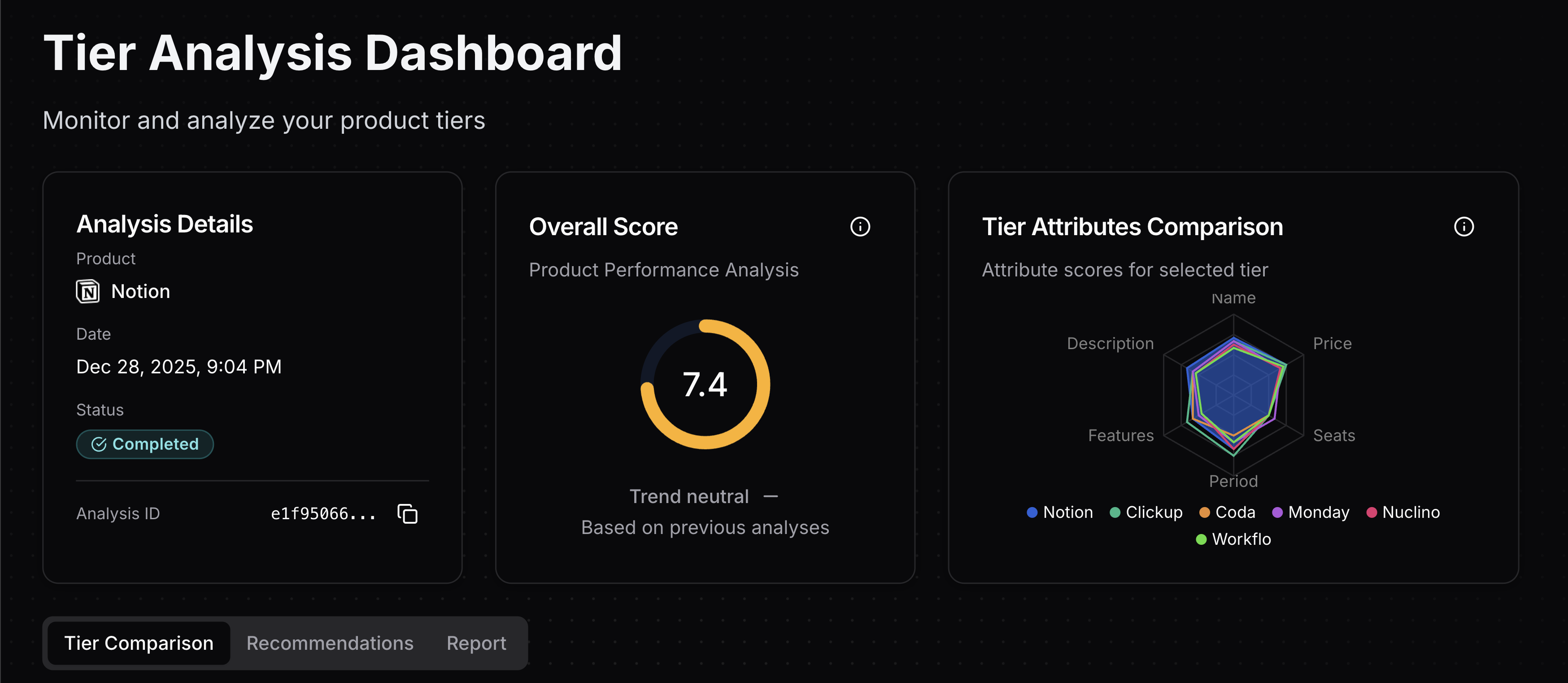 Tierly dashboard showing Notion's 7.4 overall score with competitor radar comparison
Notion ranks #2 overall, which is strong. But the scores reveal something interesting: Notion's strength is in features, while its weakness is price perception. That gap tells a strategic story.
Notion's Tier-by-Tier Breakdown
Tier Score Analysis
| Tier | Score | Strongest Attribute | Weakest Attribute |
|---|---|---|---|
| Free | 7.8 | Price (9/10) | Seats (6/10) |
| Plus | 7.3 | Period (8/10) | Price (6.5/10) |
| Business | 7.2 | Features (8/10) | Price (5.5/10) |
| Enterprise | 7.3 | Features (9/10) | Period (6/10) |
Notice the pattern? Free scores highest because it's genuinely generous. But as you move up the ladder, price perception drops while feature depth increases. That's a strategic choice with trade-offs.
Lesson 1: Your Free Tier is a Conversion Engine
Notion's Free tier scores 7.8/10, the highest in their lineup. That's not an accident.
What Notion does right:
⦿ Unlimited for individuals. While ClickUp caps storage at 60MB and Nuclino limits you to 50 items, Notion gives individuals unlimited pages and blocks. This builds habits.
⦿ Strategic limitations for teams. The moment you add a second team member, you hit collaboration limits. This is the conversion trigger.
⦿ Real value, not a demo. Notion Calendar, Gmail integration, basic forms. The Free tier solves real problems, which creates switching costs.
The insight for founders:
The purpose of a Free tier isn't revenue. It's habit formation.
Notion's Free tier scores 9/10 on price because €0 is obviously fair. But the 6/10 seats score reveals the strategy: individuals get unlimited value, teams get friction. This is intentional.
Your price is the exchange rate on the value that you're providing.
Founder takeaway: Design your Free tier to create power users, not free-riders. Gate collaboration, not core functionality.
Lesson 2: The Dangerous "Double Your Price" Jump
Here's where Notion struggles. The jump from Plus to Business is 104%. That's more than double the price.
Price Ladder Analysis
| Tier | Monthly Price | Jump from Previous |
|---|---|---|
| Free | €0 | — |
| Plus | €11.50 | — (first paid) |
| Business | €23.50 | +104% |
| Enterprise | Custom | — |
Compare this to competitors:
- ClickUp: Unlimited (€7) → Business (€12) = +71%
- Nuclino: Starter (€6) → Business (€10) = +67%
- Coda: Pro (€10) → Team (€30) = +200% (even worse)
Notion's Business tier has the lowest price score in the analysis (5.5/10). Why? Because the value justification isn't clear enough.
What triggers the Business upgrade:
- SAML SSO (security requirement)
- Granular database permissions
- Private teamspaces
- Premium integrations
These are real features. But for many teams, they feel like "enterprise tax" rather than genuine value. You need SSO because IT requires it, not because it makes your work better.
Founder takeaway: Price jumps over 50% need obvious, desire-based value, not just compliance features. If your biggest upgrade trigger is "IT said so," you have a positioning problem.
Lesson 3: Features as Fences (What Notion Gates)
A "fence" is a feature that separates tiers and triggers upgrades. Notion's fence strategy is instructive.
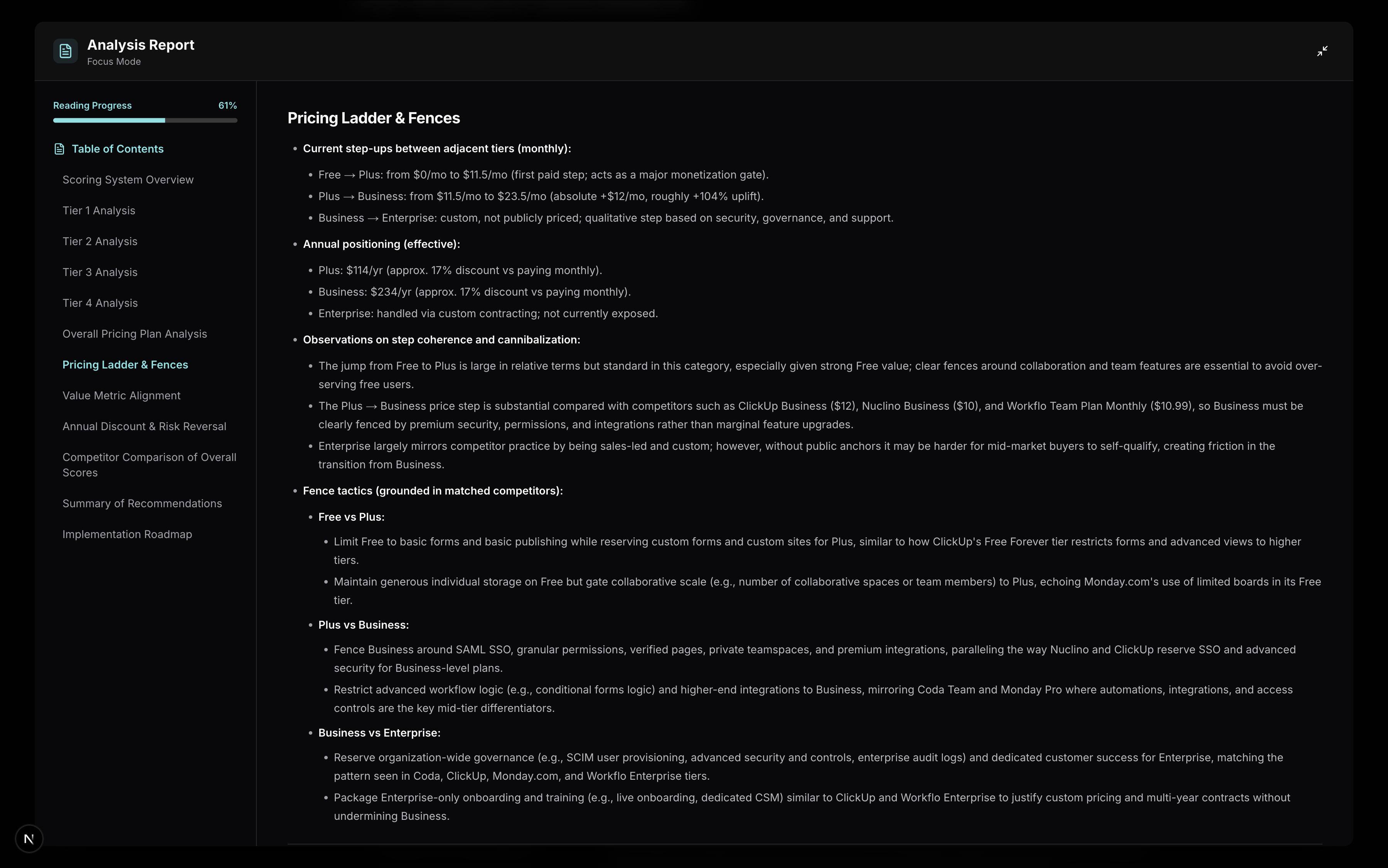 Tierly analysis showing Notion's pricing ladder and fence strategy between tiers
Notion's Fence Structure
Upgrade Trigger Framework
How Notion gates features between tiers
Free → Plus triggers:
- Hitting collaboration limits (team size, shared workspaces)
- Needing custom forms or custom sites
- Requiring integrations beyond basic
Plus → Business triggers:
- SAML SSO requirement
- Need for granular database permissions
- Private teamspaces for sensitive projects
- Premium integrations (GitHub, Jira, Asana)
Business → Enterprise triggers:
- Organization-wide deployment (SCIM provisioning)
- Advanced security and audit logs
- Dedicated customer success manager
The "Security as Premium" Strategy
Notion (like most B2B SaaS) uses security features as upgrade triggers. SSO, permissions, audit logs, these gate Business and Enterprise.
This works because:
- Security decisions are made by buyers (IT, leadership), not users
- Security requirements are non-negotiable when they exist
- It creates clear "you need this or you don't" segmentation
But it also creates friction:
- Users don't want to pay more for security
- It can feel punitive rather than valuable
- Competitors who include SSO earlier (like Nuclino Business at €10) win deals
Founder takeaway: Choose 2-3 high-signal features to fence each tier. Make at least one fence desire-based (power users want it), not just compliance-based (IT requires it).
Lesson 4: When Enterprise Pricing Helps (and Hurts)
Notion's Enterprise tier scores 9/10 on features but 6/10 on price transparency. That's the trade-off of custom pricing.
What Enterprise includes:
- Everything in Business
- User provisioning (SCIM)
- Advanced security and controls
- Audit log
- Customer success manager
- Advanced integrations
The transparency problem:
Custom pricing means mid-market companies (50-200 employees) can't self-qualify. They don't know if Enterprise is €25/seat or €50/seat, so they delay the conversation.
Tierly's recommendation: Add "starting at" ranges to help budget owners ballpark costs without committing to a sales call.
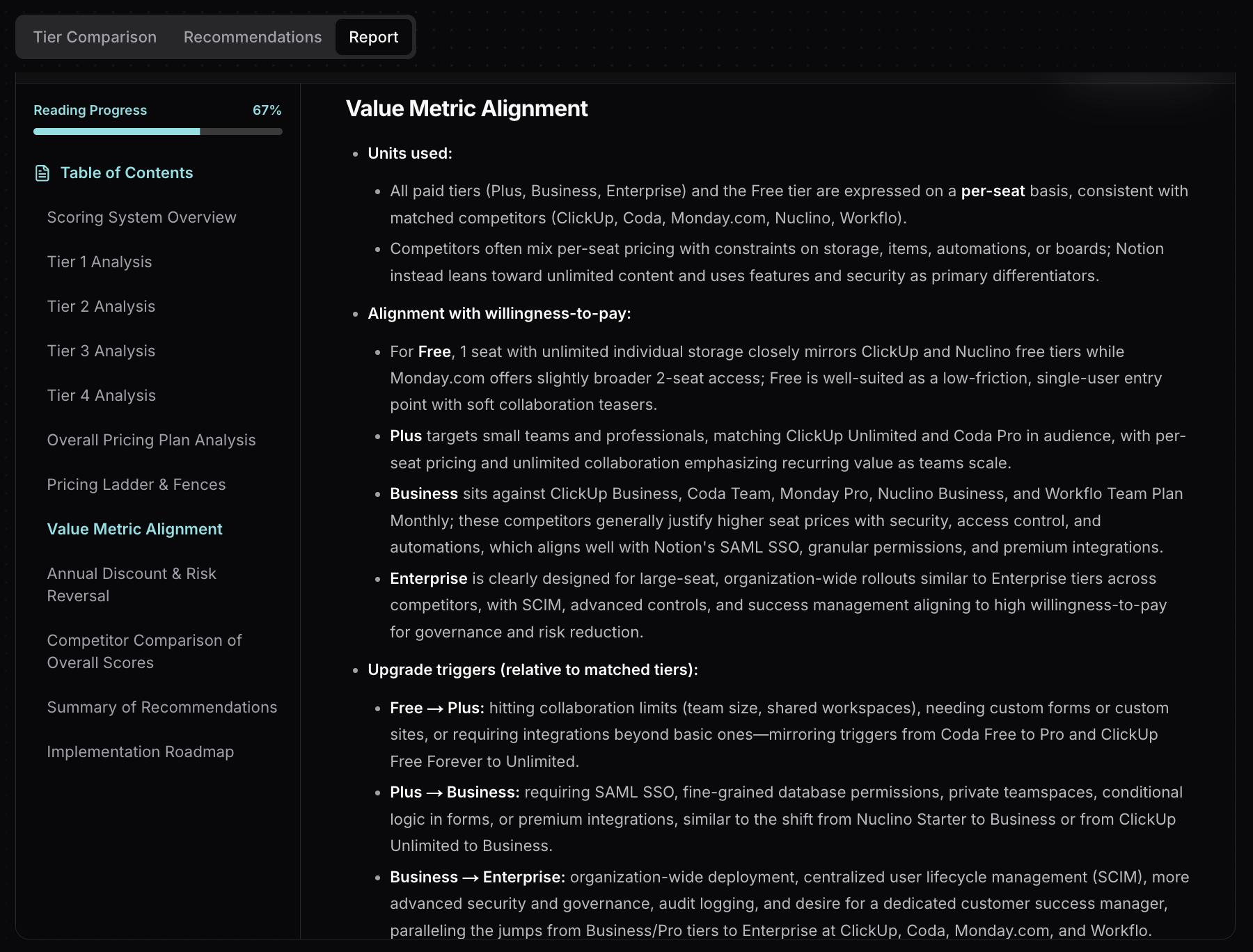 Tierly value metric alignment analysis for Notion's pricing tiers
Founder takeaway: Custom pricing works for Enterprise, but include anchors. "Starting at €X/seat for organizations over 50" reduces friction without locking you into published rates.
How Notion Compares to Competitors
Tierly matched each Notion tier to equivalent competitor tiers. Here's how they align:
| Notion Tier | ClickUp | Coda | Monday.com | Nuclino |
|---|---|---|---|---|
| Free (€0) | Free Forever (€0) | Free | Free (€0) | Free (€0) |
| Plus (€11.50) | Unlimited (€7) | Pro (€10) | Standard (€12/yr) | Starter (€6) |
| Business (€23.50) | Business (€12) | Team (€30) | Pro (€19/yr) | Business (€10) |
| Enterprise (Custom) | Enterprise | Enterprise | Enterprise | N/A |
Key observations:
⦿ Notion's Plus is expensive for its tier. At €11.50/month, it costs more than ClickUp Unlimited (€7) and Nuclino Starter (€6), which offer comparable features.
⦿ Notion's Business faces tough competition. ClickUp Business at €12 and Nuclino Business at €10 include SSO and advanced permissions at nearly half the price.
⦿ Enterprise is table stakes. All major competitors offer Enterprise tiers with similar SCIM, security, and success management features.
What Tierly Recommends for Notion
Based on the analysis, Tierly generated specific recommendations for each tier. Here's a sample:
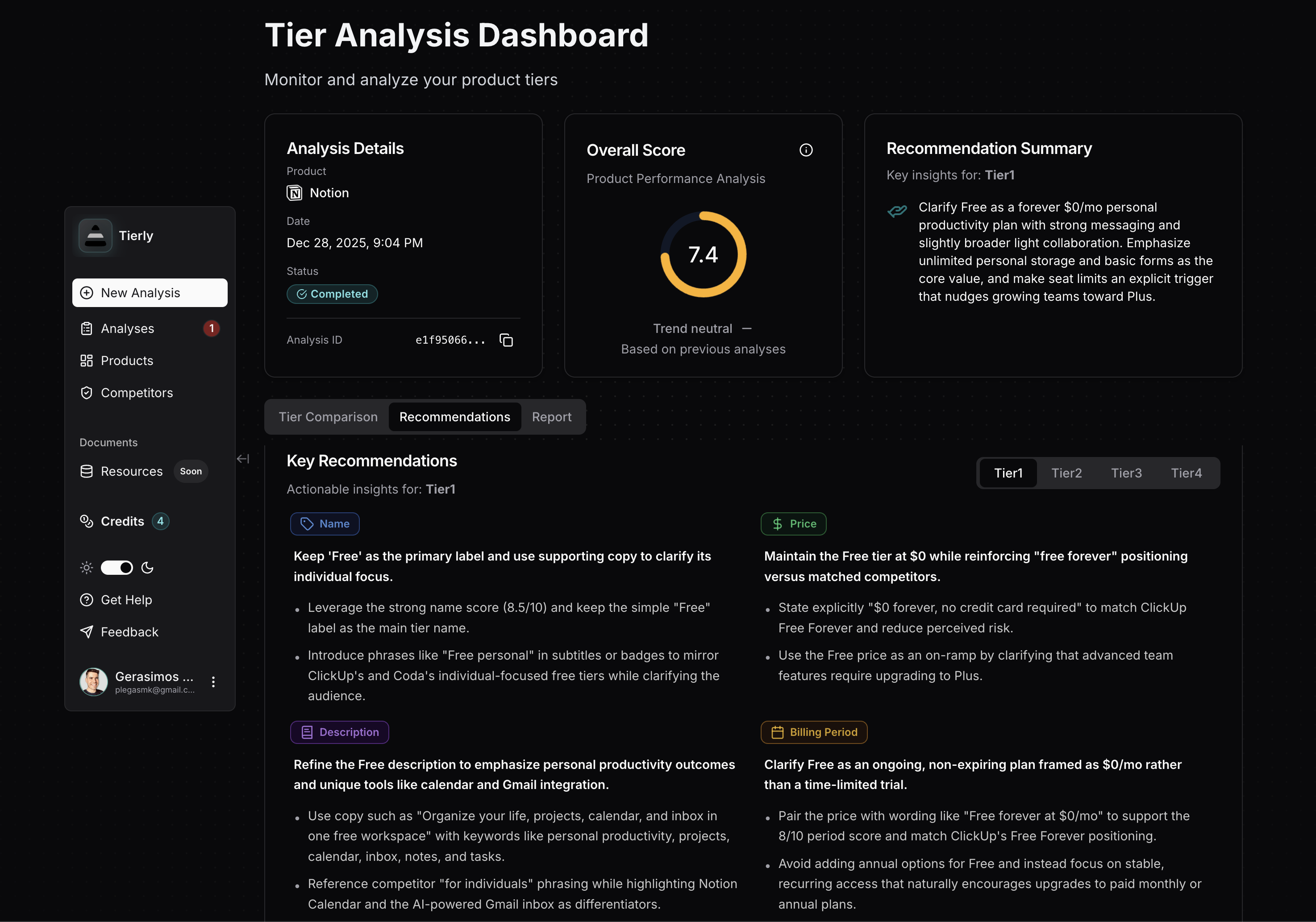 Tierly recommendations dashboard showing AI-generated pricing optimization suggestions for Notion
Recommendations
From Tierly's pricing analysis
For the Plus Tier:
Price recommendation: Reposition Plus closer to €10/month with a clearly messaged annual discount, or keep the current price but explicitly tie the premium to unlimited collaborative blocks, custom sites, and integrated forms.
Description recommendation: Rewrite to highlight team collaboration and unlimited content. Use language like "For small teams to plan projects, share knowledge, and ship work together."
For the Business Tier:
Price recommendation: Reduce to around €21/month with a 20% annual discount, positioning between Monday Pro (€19) and Coda Team (€30). Alternatively, add high-signal features to justify the premium.
Feature recommendation: Lead with SAML SSO, granular permissions, and private teamspaces. Frame conditional forms and premium integrations as workflow capabilities, not just "extras."
For Enterprise:
Price recommendation: Add "starting at" ranges in sales collateral to help mid-market companies budget without requiring immediate sales contact.
Period recommendation: Standardize on annual or multi-year contracts with structured pilots, rather than monthly self-serve options.
Notion Pricing FAQ
How much does Notion cost in 2026?
What's the best Notion plan for startups?
Why is Notion's Business tier so expensive?
How does Notion's pricing compare to ClickUp?
What is a pricing fence in SaaS?
The 4 Pricing Lessons from Notion
To summarize what SaaS founders can learn:
✦ Lesson 1: Free tiers should build habits, not extract value. Notion's Free scores highest because it's genuinely useful for individuals while strategically gating team collaboration.
✦ Lesson 2: Price jumps over 50% need clear value justification. Notion's 104% jump from Plus to Business creates their lowest price perception score.
✦ Lesson 3: Choose 2-3 high-signal features to fence each tier. Mix compliance features (SSO) with desire features (power-user capabilities).
✦ Lesson 4: Custom Enterprise pricing works, but include anchors. "Starting at" ranges help mid-market buyers self-qualify without a sales call.
Notion built a €10B company with this pricing structure. It's not perfect, but understanding why they made these choices helps you make better decisions for your own product.
Learn the fundamentals of pricing intelligence and how to build a systematic approach to tracking competitors.
Find the right competitive pricing analysis software to track competitors like Notion.
See how Linear prices its project management tool and what lessons apply to your SaaS.
Related Posts
n8n Pricing Teardown: What SaaS Founders Can Learn
A strategic analysis of n8n's pricing structure using Tierly's AI-powered competitive intelligence. Learn what works, what doesn't, and how to apply these lessons to your own SaaS.
Linear Pricing Teardown: What SaaS Founders Can Learn
A strategic analysis of Linear's pricing structure using Tierly's AI-powered competitive intelligence. Learn what works, what doesn't, and how to apply these lessons to your own SaaS.
Slack Pricing Teardown: What SaaS Founders Can Learn
A strategic analysis of Slack's pricing structure using Tierly's competitive intelligence. 5 lessons on collaboration pricing against Zoom, Google Workspace, Webex, and Pumble.